suiss/ui
  • Docs
  • Components
  • Patterns
  • Interactions
  • Charts
  • Blocks
GitHubGet started
DocsComponentsPatternsInteractionsChartsBlocks
Interactions15
  • Overview
  • Card Stack
  • Image Viewer
  • Island
  • OTP Autofill
  • Preview Menu
  • Pull to Refresh
  • Reorder List
  • Search Reveal
  • Section Index
  • Selection List
  • Stepper
  • Swipe Actions
  • Tip
  • Top Banner
  • Undo Bar

suiss/ui · Interaction

Pull to Refresh

A scroll container that refreshes its content when the user pulls down from the top.

Pull to Refresh is an open-source interaction from suiss/ui for React, React Native, SwiftUI and Jetpack Compose. The @esuiss/ui CLI copies its source into your project, so you own the code.

import * as React from "react"
import { PullToRefresh } from "@/components/interactions/pull-to-refresh"

const senders: [from: string, subject: string][] = [
  ["Acme Store", "Your order has shipped"],
  ["Jordan Lee", "Tomorrow's meeting"],
  ["Cloud Drive", "Your storage is almost full"],
  ["Taylor Kim", "Weekend plans"],
  ["Design Team", "New mockups are ready"],
  ["Sam Rivera", "Lunch on Thursday?"],
  ["Bank Alerts", "Your statement is available"],
  ["Riley Park", "Photos from the trip"],
]

const incoming: [from: string, subject: string][] = [
  ["Morgan Diaz", "Quick question about the brief"],
  ["Travel Desk", "Your flight is confirmed"],
  ["Alex Chen", "Re: Project timeline"],
  ["News Digest", "Today's top stories"],
]

type Message = { id: number; from: string; subject: string; fresh: boolean }

function wait(ms: number) {
  return new Promise((resolve) => setTimeout(resolve, ms))
}

function InboxExample({ empty = false }: { empty?: boolean }) {
  const [messages, setMessages] = React.useState<Message[]>(() =>
    empty
      ? []
      : senders.map(([from, subject], index) => ({
          id: index,
          from,
          subject,
          fresh: false,
        }))
  )
  const [log, setLog] = React.useState("Pull down from the top to refresh.")
  const count = React.useRef(0)

  const refresh = async () => {
    setLog("Refreshing…")
    await wait(1200)
    const next = incoming[count.current % incoming.length]
    if (!next) return
    const [from, subject] = next
    count.current += 1
    setMessages((current) => [
      { id: 100 + count.current, from, subject, fresh: true },
      ...current.map((message) => ({ ...message, fresh: false })),
    ])
    setLog(`New message from ${from}`)
  }

  return (
    <div className="mx-auto flex w-[min(28rem,calc(100vw-2rem))] flex-col gap-3">
      <PullToRefresh
        onRefresh={refresh}
        className="h-[min(36rem,calc(100dvh-7rem))] rounded-2xl border"
      >
        <h2 className="px-4 pt-4 pb-2 text-3xl font-bold tracking-tight">
          Inbox
        </h2>
        {messages.length === 0 ? (
          <p className="px-4 py-16 text-center text-sm text-muted-foreground">
            No messages yet.
          </p>
        ) : (
          <ul>
            {messages.map((message) => (
              <li
                key={message.id}
                data-fresh={message.fresh ? "" : undefined}
                className="ms-4 border-border not-first:border-t starting:opacity-0 data-fresh:transition-opacity data-fresh:duration-500"
              >
                <button
                  type="button"
                  onClick={() => setLog(`Opened ${message.subject}`)}
                  className="flex w-full flex-col py-3 pe-4 text-start outline-none focus-visible:ring-3 focus-visible:ring-ring/50"
                >
                  <span className="flex items-center gap-2 font-semibold">
                    {message.fresh && (
                      <span className="size-2 rounded-full bg-primary" />
                    )}
                    {message.from}
                  </span>
                  <span className="truncate text-sm text-muted-foreground">
                    {message.subject}
                  </span>
                </button>
              </li>
            ))}
          </ul>
        )}
      </PullToRefresh>
      <p role="status" className="text-sm text-muted-foreground">
        {log}
      </p>
    </div>
  )
}

export default function PullToRefreshDemo() {
  return <InboxExample />
}

PullToRefresh is a vertically scrolling container. When it is scrolled to the top, dragging down with touch, or scrolling up with a trackpad or wheel, pulls the content down with increasing resistance. An indicator above the content fills in spoke by spoke as the pull nears the threshold. Releasing past the threshold calls onRefresh, holds the content open, and swaps the indicator for the suiss/ui Spinner until the refresh finishes; a shorter pull springs back without refreshing.

The spinner stays visible for at least 600 ms so fast refreshes still read clearly. Use it for lists of fetched content, such as feeds and inboxes.

Installation

CLI

$ pnpm dlx shadcn@latest add @esuiss/pull-to-refresh

Works in any project with a components.json. See Installation for the one-line registry setup. Or use the suiss/ui CLI:

$ pnpm dlx @esuiss/ui@latest add interactions pull-to-refresh

Manual

  1. Add the cn helper.

  2. Add the pieces it builds on: Spinner.

  3. Copy the source into components/interactions/pull-to-refresh.tsx:

components/interactions/pull-to-refresh.tsx
"use client"

import * as React from "react"
import { Spinner } from "@/components/ui/spinner"
import { cn } from "@/lib/utils"

type PullToRefreshPhase = "idle" | "pulling" | "refreshing" | "settling"

const THRESHOLD = 64
const HOLD = 52
const MAX = 128
const MIN_REFRESH = 600
const SETTLE = 400
const WHEEL_GAP = 250
const WHEEL_IDLE = 200
const SPOKES = 8
  1. Update the import paths to match your project.

Usage

import { PullToRefresh } from "@/components/interactions/pull-to-refresh"
<InboxExample />
  • Give PullToRefresh a bounded height so its content scrolls inside it.
  • onRefresh can return a promise; the container stays in the refreshing state until it settles, whether it resolves or rejects.
  • Pulls only start at the top of the scroll position and are ignored while a refresh is in progress.

Examples

Empty list

An empty inbox refreshes from a trackpad pull and fills in with the first message.

import * as React from "react"
import { PullToRefresh } from "@/components/interactions/pull-to-refresh"

const senders: [from: string, subject: string][] = [
  ["Acme Store", "Your order has shipped"],
  ["Jordan Lee", "Tomorrow's meeting"],
  ["Cloud Drive", "Your storage is almost full"],
  ["Taylor Kim", "Weekend plans"],
  ["Design Team", "New mockups are ready"],
  ["Sam Rivera", "Lunch on Thursday?"],
  ["Bank Alerts", "Your statement is available"],
  ["Riley Park", "Photos from the trip"],
]

const incoming: [from: string, subject: string][] = [
  ["Morgan Diaz", "Quick question about the brief"],
  ["Travel Desk", "Your flight is confirmed"],
  ["Alex Chen", "Re: Project timeline"],
  ["News Digest", "Today's top stories"],
]

type Message = { id: number; from: string; subject: string; fresh: boolean }

function wait(ms: number) {
  return new Promise((resolve) => setTimeout(resolve, ms))
}

function InboxExample({ empty = false }: { empty?: boolean }) {
  const [messages, setMessages] = React.useState<Message[]>(() =>
    empty
      ? []
      : senders.map(([from, subject], index) => ({
          id: index,
          from,
          subject,
          fresh: false,
        }))
  )
  const [log, setLog] = React.useState("Pull down from the top to refresh.")
  const count = React.useRef(0)

  const refresh = async () => {
    setLog("Refreshing…")
    await wait(1200)
    const next = incoming[count.current % incoming.length]
    if (!next) return
    const [from, subject] = next
    count.current += 1
    setMessages((current) => [
      { id: 100 + count.current, from, subject, fresh: true },
      ...current.map((message) => ({ ...message, fresh: false })),
    ])
    setLog(`New message from ${from}`)
  }

  return (
    <div className="mx-auto flex w-[min(28rem,calc(100vw-2rem))] flex-col gap-3">
      <PullToRefresh
        onRefresh={refresh}
        className="h-[min(36rem,calc(100dvh-7rem))] rounded-2xl border"
      >
        <h2 className="px-4 pt-4 pb-2 text-3xl font-bold tracking-tight">
          Inbox
        </h2>
        {messages.length === 0 ? (
          <p className="px-4 py-16 text-center text-sm text-muted-foreground">
            No messages yet.
          </p>
        ) : (
          <ul>
            {messages.map((message) => (
              <li
                key={message.id}
                data-fresh={message.fresh ? "" : undefined}
                className="ms-4 border-border not-first:border-t starting:opacity-0 data-fresh:transition-opacity data-fresh:duration-500"
              >
                <button
                  type="button"
                  onClick={() => setLog(`Opened ${message.subject}`)}
                  className="flex w-full flex-col py-3 pe-4 text-start outline-none focus-visible:ring-3 focus-visible:ring-ring/50"
                >
                  <span className="flex items-center gap-2 font-semibold">
                    {message.fresh && (
                      <span className="size-2 rounded-full bg-primary" />
                    )}
                    {message.from}
                  </span>
                  <span className="truncate text-sm text-muted-foreground">
                    {message.subject}
                  </span>
                </button>
              </li>
            ))}
          </ul>
        )}
      </PullToRefresh>
      <p role="status" className="text-sm text-muted-foreground">
        {log}
      </p>
    </div>
  )
}

export default function PullToRefreshEmptyList() {
  return <InboxExample empty />
}

API Reference

01

PullToRefresh

The scroll container that tracks the pull and shows the refresh indicator.

PropTypeDefaultDescription
onRefresh() => Promise<unknown> | unknownRequiredCalled when the user releases past the threshold; may return a promise.

Also accepts the props of React.ComponentProps<"div">.

Accessibility

  • The container sets aria-busy while refreshing.
  • The spinner is labelled Refreshing; the pull indicator is aria-hidden.
  • Pulling requires touch or a scroll gesture, so offer another way to refresh where it matters, such as a button.

Notes

  • The root exposes data-slot="pull-to-refresh" and data-phase (idle, pulling, refreshing, settling). The indicator and content use pull-to-refresh-indicator and pull-to-refresh-content.
  • The --pull and --pull-progress custom properties track the pull distance and progress toward the threshold.
  • Transitions are disabled under prefers-reduced-motion.
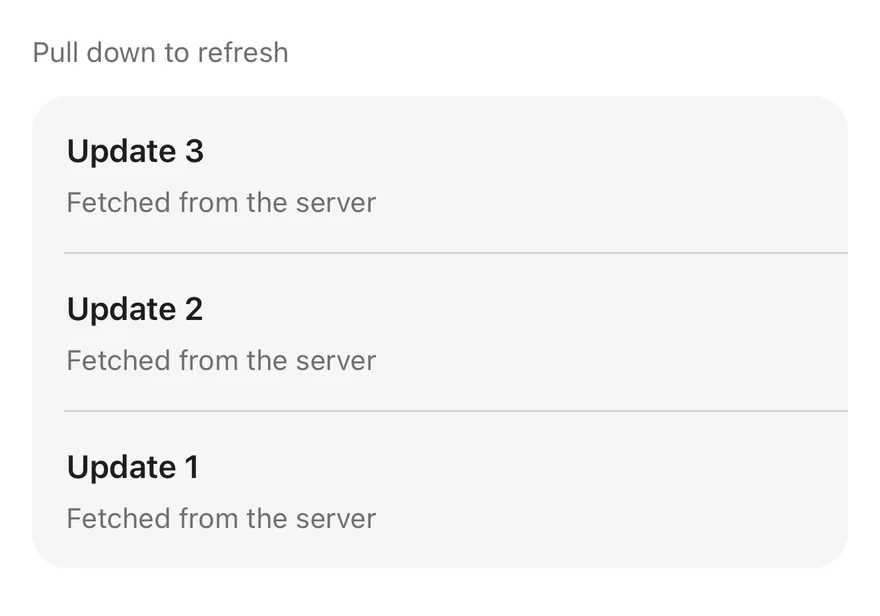
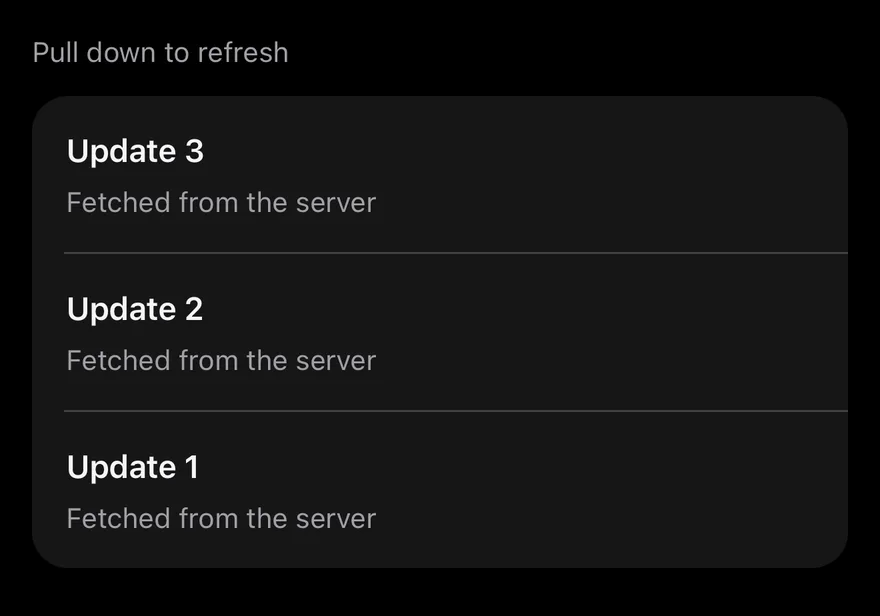
iOS
Pull To Refresh on iOS in light modePull To Refresh on iOS in dark mode
import * as React from "react"
import { View } from "react-native"
import { PullToRefresh } from "@/components/interactions/pull-to-refresh"
import { Item, ItemContent, ItemDescription, ItemGroup, ItemSeparator, ItemTitle } from "@/components/ui/item"
import { Text } from "@/components/ui/text"

const wait = (ms: number) => new Promise((resolve) => setTimeout(resolve, ms))

function Feed() {
  const [count, setCount] = React.useState(3)
  return (
    <PullToRefresh
      onRefresh={async () => {
        await wait(1200)
        setCount((current) => current + 1)
      }}
      contentContainerClassName="gap-3"
    >
      <Text className="text-sm text-muted-foreground">
        Pull down to refresh
      </Text>
      <ItemGroup variant="inset">
        {Array.from({ length: count }, (_, index) => count - index).map(
          (update, index) => (
            <React.Fragment key={update}>
              {index > 0 ? <ItemSeparator /> : null}
              <Item>
                <ItemContent>
                  <ItemTitle>Update {update}</ItemTitle>
                  <ItemDescription>Fetched from the server</ItemDescription>
                </ItemContent>
              </Item>
            </React.Fragment>
          )
        )}
      </ItemGroup>
    </PullToRefresh>
  )
}

export function PullToRefreshExample() {
  return (
    <View className="flex-1">
      <Feed />
    </View>
  )
}
import EsuissUI
import SwiftUI

struct PullToRefreshFeed: View {
  @State private var count = 3

  var body: some View {
    PullToRefresh {
      try? await Task.sleep(for: .milliseconds(1200))
      count += 1
    } content: {
      VStack(alignment: .leading, spacing: 12) {
        Text("Pull down to refresh")
          .textStyle(.sm)
          .foregroundStyle(EsuissColor.mutedForeground)
        ItemGroup(.inset) {
          ForEach(Array((1...count).reversed()), id: \.self) { update in
            if update != count {
              ItemSeparator()
            }
            Item {
              ItemContent {
                ItemTitle(verbatim: "Update \(update)")
                ItemDescription("Fetched from the server")
              }
            }
          }
        }
      }
    }
  }
}
import androidx.compose.foundation.layout.Arrangement
import androidx.compose.foundation.layout.Column
import androidx.compose.foundation.layout.fillMaxSize
import androidx.compose.foundation.layout.fillMaxWidth
import androidx.compose.foundation.layout.height
import androidx.compose.foundation.rememberScrollState
import androidx.compose.foundation.verticalScroll
import androidx.compose.runtime.Composable
import androidx.compose.runtime.getValue
import androidx.compose.runtime.key
import androidx.compose.runtime.mutableIntStateOf
import androidx.compose.runtime.saveable.rememberSaveable
import androidx.compose.runtime.setValue
import androidx.compose.ui.Modifier
import androidx.compose.ui.unit.dp
import com.esuiss.ui.components.Item
import com.esuiss.ui.components.ItemContent
import com.esuiss.ui.components.ItemDescription
import com.esuiss.ui.components.ItemGroup
import com.esuiss.ui.components.ItemGroupVariant
import com.esuiss.ui.components.ItemSeparator
import com.esuiss.ui.components.ItemTitle
import com.esuiss.ui.components.Text
import com.esuiss.ui.interactions.PullToRefresh
import com.esuiss.ui.theme.EsuissTheme
import com.esuiss.ui.theme.Typography
import kotlinx.coroutines.delay

val pullToRefreshViewport = Modifier.fillMaxWidth().height(600.dp)

@Composable
fun PullToRefreshFeed() {
    var count by rememberSaveable { mutableIntStateOf(3) }
    PullToRefresh(
        onRefresh = {
            delay(1200)
            count += 1
        },
        modifier = pullToRefreshViewport,
    ) {
        Column(
            modifier = Modifier.fillMaxSize().verticalScroll(rememberScrollState()),
            verticalArrangement = Arrangement.spacedBy(12.dp),
        ) {
            Text("Pull down to refresh", style = Typography.sm.copy(color = EsuissTheme.colors.mutedForeground))
            ItemGroup(variant = ItemGroupVariant.Inset) {
                (count downTo 1).forEachIndexed { index, update ->
                    key(update) {
                        if (index > 0) ItemSeparator()
                        Item {
                            ItemContent {
                                ItemTitle("Update $update")
                                ItemDescription("Fetched from the server")
                            }
                        }
                    }
                }
            }
        }
    }
}

PullToRefresh is a ScrollView with a native RefreshControl. Pulling down past the top starts a refresh: a light impact haptic plays, the spinner shows, and onRefresh runs.

The spinner stays for at least 600 ms, even when onRefresh resolves sooner, so it does not flicker. It also hides if onRefresh throws or rejects. Use PullToRefreshControl to add the same behavior to a FlatList or SectionList.

Installation

$ pnpm dlx shadcn@latest add @esuiss-rn/pull-to-refresh

See Installation for the components.json setup. Or use the suiss/ui CLI:

$ pnpm dlx @esuiss/ui@latest add pull-to-refresh
$ pnpm dlx @esuiss/ui@latest add pull-to-refresh --platform swift
$ pnpm dlx @esuiss/ui@latest add pull-to-refresh --platform kotlin

Manual

  1. Install the dependencies:
npx expo install cn uniwind
  1. Add the pieces it builds on: the primitives components/primitives/haptics.tsx.

  2. Copy the source into components/interactions/pull-to-refresh.tsx:

uniwind/components/interactions/pull-to-refresh.tsx
import { cn } from "cn"
import * as React from "react"
import {
  type ColorValue,
  RefreshControl,
  type RefreshControlProps,
  ScrollView,
} from "react-native"
import { withUniwind } from "uniwind"
import { useHaptics } from "@/components/primitives/haptics"

const MIN_REFRESH = 600

type RefreshHandler = () => Promise<unknown> | unknown

function useRefresh(onRefresh: RefreshHandler) {
  1. Update the import paths to match your project.
  1. Install the dependencies:
npx expo install cn nativewind
  1. Add the pieces it builds on: the primitives components/primitives/haptics.tsx.

  2. Copy the source into components/interactions/pull-to-refresh.tsx:

nativewind/components/interactions/pull-to-refresh.tsx
import { cn } from "cn"
import { cssInterop } from "nativewind"
import * as React from "react"
import {
  type ColorValue,
  RefreshControl,
  type RefreshControlProps,
  ScrollView,
} from "react-native"
import { useHaptics } from "@/components/primitives/haptics"

const MIN_REFRESH = 600

type RefreshHandler = () => Promise<unknown> | unknown

function useRefresh(onRefresh: RefreshHandler) {
  1. Update the import paths to match your project.
  1. Add the pieces it builds on: the primitives components/primitives/haptics.tsx.

  2. Copy the source into components/interactions/pull-to-refresh.tsx:

stylesheet/components/interactions/pull-to-refresh.tsx
import * as React from "react"
import {
  RefreshControl,
  type RefreshControlProps,
  ScrollView,
} from "react-native"
import { useHaptics } from "@/components/primitives/haptics"
import { useTheme } from "@/components/ui/theme"

const MIN_REFRESH = 600

type RefreshHandler = () => Promise<unknown> | unknown

function useRefresh(onRefresh: RefreshHandler) {
  const [refreshing, setRefreshing] = React.useState(false)
  const onRefreshRef = React.useRef(onRefresh)
  1. Update the import paths to match your project.
  1. Target iOS 17 or later.

  2. Copy the theme files every view uses:

swift/Theme/Theme.swift
import SwiftUI
import UIKit

struct RGBA: Sendable {
  let red: CGFloat
  let green: CGFloat
  let blue: CGFloat
  let alpha: CGFloat

  init(_ hex: UInt32, _ alpha: CGFloat = 1) {
    red = CGFloat((hex >> 16) & 0xFF) / 255
    green = CGFloat((hex >> 8) & 0xFF) / 255
    blue = CGFloat(hex & 0xFF) / 255
    self.alpha = alpha
  }
swift/Theme/Tokens.swift
import SwiftUI

public enum EsuissColor {
  public static let background = Color.adaptive(light: .init(0xFFFFFF), dark: .init(0x000000))
  public static let foreground = Color.adaptive(light: .init(0x1D1D1F), dark: .init(0xF5F5F7))
  public static let card = Color.adaptive(light: .init(0xFFFFFF), dark: .init(0x1D1D1F))
  public static let cardForeground = Color.adaptive(light: .init(0x1D1D1F), dark: .init(0xF5F5F7))
  public static let popover = Color.adaptive(light: .init(0xFFFFFF), dark: .init(0x1D1D1F))
  public static let popoverForeground = Color.adaptive(light: .init(0x1D1D1F), dark: .init(0xF5F5F7))
  public static let primary = Color.adaptive(light: .init(0x0071E3), dark: .init(0x2997FF))
  public static let primaryForeground = Color.adaptive(light: .init(0xFFFFFF), dark: .init(0xFFFFFF))
  public static let secondary = Color.adaptive(light: .init(0x000000, 0.04), dark: .init(0xFFFFFF, 0.1))
  public static let secondaryForeground = Color.adaptive(light: .init(0x1D1D1F), dark: .init(0xF5F5F7))
  public static let muted = Color.adaptive(light: .init(0xF5F5F7), dark: .init(0x161617))
  public static let mutedForeground = Color.adaptive(light: .init(0x6E6E73), dark: .init(0xA1A1A6))
  public static let accent = Color.adaptive(light: .init(0x000000, 0.06), dark: .init(0xFFFFFF, 0.1))
  1. Copy the source and every file it uses:
swift/Interactions/PullToRefresh.swift
import SwiftUI

public struct PullToRefresh<Content: View>: View {
  let onRefresh: @MainActor @Sendable () async -> Void
  let content: Content

  @State private var refreshing = false

  public init(
    onRefresh: @escaping @MainActor @Sendable () async -> Void,
    @ViewBuilder content: () -> Content
  ) {
    self.onRefresh = onRefresh
    self.content = content()
  }
swift/Components/Haptics.swift
import SwiftUI

extension EnvironmentValues {
  @Entry public var hapticsEnabled = true
}

extension View {
  public func haptics(_ enabled: Bool) -> some View {
    environment(\.hapticsEnabled, enabled)
  }

  func hapticFeedback<Trigger: Equatable>(_ feedback: SensoryFeedback, trigger: Trigger) -> some View {
    modifier(HapticFeedbackModifier(feedback: feedback, trigger: trigger) { _, _ in true })
  }

  func hapticFeedback<Trigger: Equatable>(
  1. Add the files to your app target.
  1. Set minSdk to 24 or higher and add the dependencies:
build.gradle.kts
implementation(platform("androidx.compose:compose-bom:2026.09.00"))
implementation("androidx.compose.foundation:foundation")
implementation("androidx.compose.ui:ui")
  1. Copy the theme files every view uses:
kotlin/theme/Theme.kt
package com.esuiss.ui.theme

import androidx.compose.foundation.isSystemInDarkTheme
import androidx.compose.runtime.Composable
import androidx.compose.runtime.CompositionLocalProvider
import androidx.compose.runtime.Immutable
import androidx.compose.runtime.staticCompositionLocalOf
import androidx.compose.ui.Modifier
import androidx.compose.ui.draw.dropShadow
import androidx.compose.ui.graphics.Color
import androidx.compose.ui.graphics.Shape
import androidx.compose.ui.graphics.shadow.Shadow as DropShadow
import androidx.compose.ui.text.TextStyle
import androidx.compose.ui.text.style.LineHeightStyle
import androidx.compose.ui.unit.Dp
import androidx.compose.ui.unit.DpOffset
kotlin/theme/Tokens.kt
package com.esuiss.ui.theme

import androidx.compose.runtime.Immutable
import androidx.compose.ui.graphics.Color
import androidx.compose.ui.unit.dp

@Immutable
data class Colors(
    val background: Color,
    val foreground: Color,
    val card: Color,
    val cardForeground: Color,
    val popover: Color,
    val popoverForeground: Color,
    val primary: Color,
    val primaryForeground: Color,
  1. Copy the source and every file it uses:
kotlin/interactions/PullToRefresh.kt
package com.esuiss.ui.interactions

import androidx.compose.animation.core.animate
import androidx.compose.animation.core.animateFloatAsState
import androidx.compose.animation.core.tween
import androidx.compose.foundation.Canvas
import androidx.compose.foundation.layout.Box
import androidx.compose.foundation.layout.fillMaxWidth
import androidx.compose.foundation.layout.offset
import androidx.compose.foundation.layout.size
import androidx.compose.runtime.Composable
import androidx.compose.runtime.LaunchedEffect
import androidx.compose.runtime.getValue
import androidx.compose.runtime.mutableFloatStateOf
import androidx.compose.runtime.mutableStateOf
import androidx.compose.runtime.remember
kotlin/components/Content.kt
package com.esuiss.ui.components

import androidx.compose.runtime.compositionLocalOf
import androidx.compose.ui.graphics.Color
import androidx.compose.ui.text.TextStyle
import androidx.compose.ui.unit.Dp
import androidx.compose.ui.unit.dp

val LocalContentStyle = compositionLocalOf { TextStyle.Default }

val LocalContentColor = compositionLocalOf { Color.Unspecified }

val LocalIconSize = compositionLocalOf { 20.dp }
kotlin/components/FormSupport.kt
package com.esuiss.ui.components

import android.provider.Settings
import androidx.compose.animation.core.CubicBezierEasing
import androidx.compose.foundation.background
import androidx.compose.foundation.border
import androidx.compose.foundation.gestures.Orientation
import androidx.compose.foundation.text.selection.TextSelectionColors
import androidx.compose.runtime.Composable
import androidx.compose.runtime.mutableStateOf
import androidx.compose.runtime.remember
import androidx.compose.ui.Modifier
import androidx.compose.ui.draw.alpha
import androidx.compose.ui.draw.clip
import androidx.compose.ui.draw.drawWithContent
import androidx.compose.ui.geometry.Offset
kotlin/components/Haptics.kt
package com.esuiss.ui.components

import androidx.compose.runtime.Composable
import androidx.compose.runtime.CompositionLocalProvider
import androidx.compose.runtime.remember
import androidx.compose.runtime.staticCompositionLocalOf
import androidx.compose.ui.hapticfeedback.HapticFeedback
import androidx.compose.ui.hapticfeedback.HapticFeedbackType
import androidx.compose.ui.platform.LocalHapticFeedback

val LocalHapticsEnabled = staticCompositionLocalOf { true }

@Composable
fun ProvideHaptics(enabled: Boolean, content: @Composable () -> Unit) {
    CompositionLocalProvider(LocalHapticsEnabled provides enabled, content = content)
}
kotlin/components/Spinner.kt
package com.esuiss.ui.components

import androidx.compose.animation.core.LinearEasing
import androidx.compose.animation.core.RepeatMode
import androidx.compose.animation.core.animateFloat
import androidx.compose.animation.core.infiniteRepeatable
import androidx.compose.animation.core.rememberInfiniteTransition
import androidx.compose.animation.core.tween
import androidx.compose.foundation.Canvas
import androidx.compose.foundation.layout.size
import androidx.compose.runtime.Composable
import androidx.compose.runtime.State
import androidx.compose.runtime.remember
import androidx.compose.runtime.mutableFloatStateOf
import androidx.compose.ui.Modifier
import androidx.compose.ui.geometry.CornerRadius
  1. Update the com.esuiss.ui package names to match your project.

Usage

import { PullToRefreshControl, PullToRefresh } from "@/components/interactions/pull-to-refresh"
<View className="flex-1">
  <Feed />
</View>

Pass an onRefresh that returns a promise, or nothing for synchronous work. All other ScrollView props pass through to PullToRefresh.

For lists, pass <PullToRefreshControl onRefresh={...} /> as the list's refreshControl. It manages its own refreshing state; pass refreshing to override it. Other RefreshControl props pass through.

Examples

With flat list

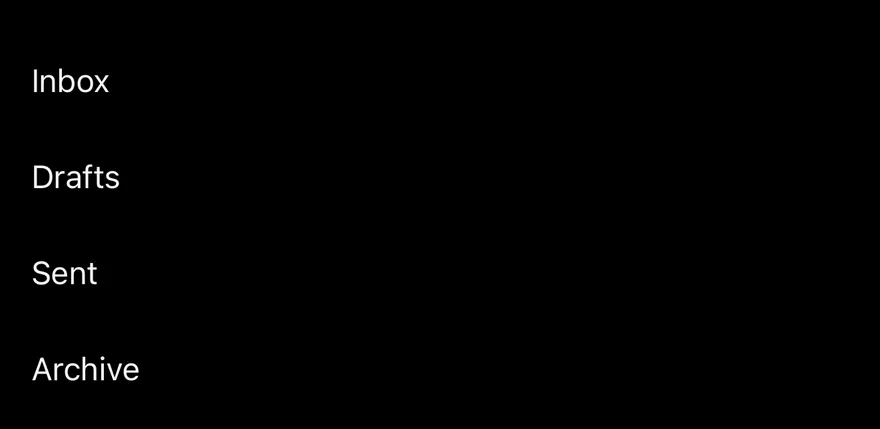
Uses PullToRefreshControl as the refreshControl of a FlatList.

iOS
Pull To Refresh (with flat list) on iOS in light modePull To Refresh (with flat list) on iOS in dark mode
import { FlatList } from "react-native"
import { PullToRefreshControl } from "@/components/interactions/pull-to-refresh"
import { Text } from "@/components/ui/text"

const wait = (ms: number) => new Promise((resolve) => setTimeout(resolve, ms))

export function PullToRefreshWithFlatListExample() {
  return (
    <FlatList
      data={["Inbox", "Drafts", "Sent", "Archive"]}
      keyExtractor={(item) => item}
      refreshControl={<PullToRefreshControl onRefresh={() => wait(1000)} />}
      renderItem={({ item }) => <Text className="py-3 text-base">{item}</Text>}
    />
  )
}
import EsuissUI
import SwiftUI

struct PullToRefreshList: View {
  var body: some View {
    ScrollView {
      LazyVStack(alignment: .leading, spacing: 0) {
        ForEach(["Inbox", "Drafts", "Sent", "Archive"], id: \.self) { item in
          Text(verbatim: item)
            .textStyle(.base)
            .foregroundStyle(EsuissColor.foreground)
            .padding(.vertical, 12)
            .frame(maxWidth: .infinity, alignment: .leading)
        }
      }
    }
    .pullToRefresh {
      try? await Task.sleep(for: .milliseconds(1000))
    }
  }
}
import androidx.compose.foundation.layout.fillMaxSize
import androidx.compose.foundation.layout.fillMaxWidth
import androidx.compose.foundation.layout.height
import androidx.compose.foundation.layout.padding
import androidx.compose.foundation.lazy.LazyColumn
import androidx.compose.foundation.lazy.items
import androidx.compose.runtime.Composable
import androidx.compose.runtime.key
import androidx.compose.ui.Modifier
import androidx.compose.ui.unit.dp
import com.esuiss.ui.components.Text
import com.esuiss.ui.interactions.PullToRefresh
import com.esuiss.ui.theme.Typography
import kotlinx.coroutines.delay

val pullToRefreshViewport = Modifier.fillMaxWidth().height(600.dp)

@Composable
fun PullToRefreshFlatList() {
    PullToRefresh(onRefresh = { delay(1000) }, modifier = pullToRefreshViewport) {
        LazyColumn(Modifier.fillMaxSize()) {
            items(listOf("Inbox", "Drafts", "Sent", "Archive"), key = { it }) { item ->
                Text(item, modifier = Modifier.padding(vertical = 12.dp), style = Typography.base)
            }
        }
    }
}

API Reference

01

PullToRefreshControl

A RefreshControl for any list or scroll view.

PropTypeDefaultDescription
onRefreshRefreshHandlerRequiredCalled when the user pulls to refresh; the spinner waits for the returned promise.
refreshingboolean-Overrides the internal refreshing state.

Also accepts the props of RefreshControlProps.

02

PullToRefresh

A ScrollView with built-in pull to refresh.

PropTypeDefaultDescription
onRefreshRefreshHandlerRequiredCalled when the user pulls to refresh; the spinner waits for the returned promise.

Also accepts the props of React.ComponentProps<typeof ScrollView>.

Accessibility

  • PullToRefresh exposes a busy state while refreshing.
  • PullToRefreshControl is labelled Refreshing while active.

Notes

  • The haptic plays only if the app provides an adapter through HapticsProvider.
  • The spinner uses the muted-foreground color, and on Android its background uses card, so both follow light and dark mode.
NextReorder ListPreviousPreview Menu

On this page

  1. 01Installation
    • CLI
    • Manual
  2. 02Usage
  3. 03Examples
    • Empty list
  4. 04API Reference
    • PullToRefresh
  5. 05Accessibility
  6. 06Notes
  7. 07Installation
    • Manual
  8. 08Usage
  9. 09Examples
    • With flat list
  10. 10API Reference
    • PullToRefreshControl
    • PullToRefresh
  11. 11Accessibility
  12. 12Notes