# Keyboard Scroll View
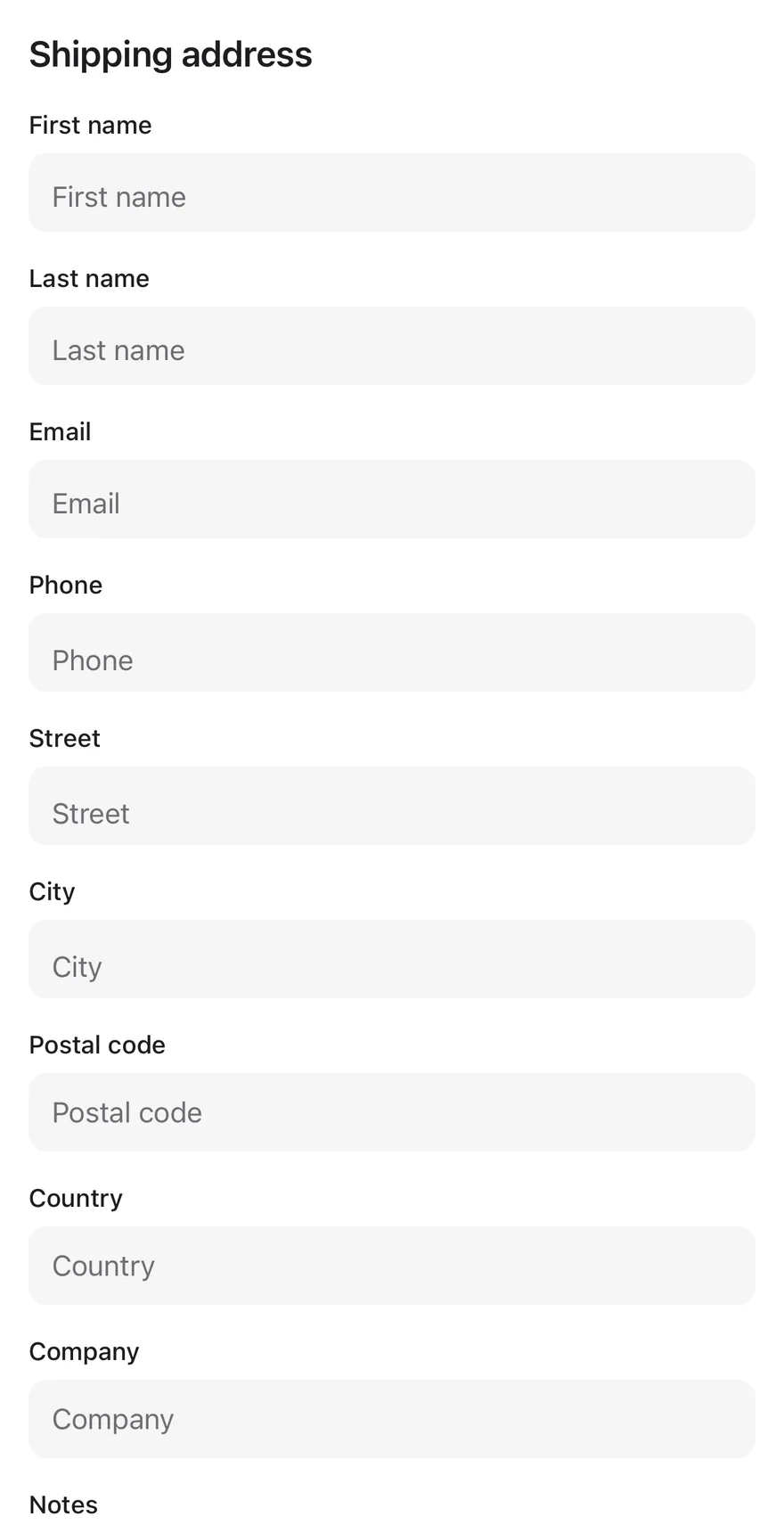
A scroll view that keeps the focused text field visible above the on-screen keyboard.
Keyboard Scroll View is an open-source component from suiss/ui for React Native, SwiftUI and Jetpack Compose. The @esuiss/ui CLI copies its source into your project, so you own the code.
Source: https://ui.suiss.app/docs/components/keyboard-scroll-view
**React Native, SwiftUI, Jetpack Compose**
```tsx
import { View } from "react-native"
import { Input } from "@/components/ui/input"
import { KeyboardScrollView } from "@/components/ui/keyboard-scroll-view"
import { Text } from "@/components/ui/text"
const fields = [
"First name",
"Last name",
"Email",
"Phone",
"Street",
"City",
"Postal code",
"Country",
"Company",
"Notes",
]
function Fields() {
return fields.map((label) => (
{label}
))
}
export function KeyboardScrollViewExample() {
return (
Shipping address
)
}
```
```swift
import EsuissUI
import SwiftUI
struct KeyboardScrollViewExample: View {
var body: some View {
KeyboardScrollView {
VStack(alignment: .leading, spacing: 16) {
Text("Shipping address").textVariant(.h3)
KeyboardScrollViewFields(labels: KeyboardScrollViewFields.all)
}
.padding(16)
}
}
}
struct KeyboardScrollViewFields: View {
static let all = [
"First name",
"Last name",
"Email",
"Phone",
"Street",
"City",
"Postal code",
"Country",
"Company",
"Notes",
]
let labels: [String]
var body: some View {
ForEach(labels, id: \.self) { label in
KeyboardScrollViewField(label: label)
}
}
}
struct KeyboardScrollViewField: View {
let label: String
@State private var text = ""
var body: some View {
VStack(alignment: .leading, spacing: 6) {
Text(label).textVariant(.small)
TextField(label, text: $text)
.textFieldStyle(.input)
}
.frame(maxWidth: .infinity, alignment: .leading)
}
}
let all = [
"First name",
"Last name",
"Email",
"Phone",
"Street",
"City",
"Postal code",
"Country",
"Company",
"Notes",
]
```
```kotlin
import androidx.compose.foundation.layout.Arrangement
import androidx.compose.foundation.layout.PaddingValues
import androidx.compose.foundation.layout.fillMaxSize
import androidx.compose.runtime.Composable
import androidx.compose.ui.Modifier
import androidx.compose.ui.unit.dp
import com.esuiss.ui.components.KeyboardScrollView
import com.esuiss.ui.components.Screen
import com.esuiss.ui.components.Text
import com.esuiss.ui.components.TextVariant
@Composable
fun KeyboardScrollViewDefault() {
Screen {
KeyboardScrollView(
modifier = Modifier.fillMaxSize(),
contentPadding = PaddingValues(16.dp),
verticalArrangement = Arrangement.spacedBy(16.dp),
) {
Text("Shipping address", variant = TextVariant.H3)
KeyboardScrollViewFields()
}
}
}
```
`KeyboardScrollView` wraps the React Native `ScrollView`. When the keyboard opens, it measures how much of the view the keyboard covers, adds matching space at the end of the content and scroll indicator, and scrolls just enough to bring the focused input above the keyboard.
Use it for forms and other screens with text fields that would otherwise end up behind the keyboard.
## Installation
**React Native**
```bash title="Terminal"
npx shadcn@latest add @esuiss-rn/keyboard-scroll-view
```
See [Installation](https://ui.suiss.app/docs/installation) for the `components.json` setup. Or use the suiss/ui CLI:
```bash title="Terminal"
npx @esuiss/ui@latest add keyboard-scroll-view
```
**SwiftUI**
```bash title="Terminal"
npx @esuiss/ui@latest add keyboard-scroll-view --platform swift
```
**Jetpack Compose**
```bash title="Terminal"
npx @esuiss/ui@latest add keyboard-scroll-view --platform kotlin
```
### Manual
**React Native**
**Uniwind**
1. Install the dependencies:
```bash title="Terminal"
npx expo install cn
```
2. Add the pieces it builds on: the primitives `components/primitives/hooks.tsx`, `components/primitives/keyboard.tsx`.
3. Copy the source into `components/ui/keyboard-scroll-view.tsx`:
```tsx title="uniwind/components/ui/keyboard-scroll-view.tsx"
import { cn } from "cn"
import * as React from "react"
import {
Platform,
ScrollView,
type ScrollViewProps,
TextInput,
useWindowDimensions,
View,
} from "react-native"
import { useComposedRefs } from "@/components/primitives/hooks"
import { useKeyboard } from "@/components/primitives/keyboard"
type KeyboardScrollViewContextValue = {
scrollToFocused: () => void
}
const KeyboardScrollViewContext =
React.createContext(null)
function KeyboardScrollView({
bottomOffset = 16,
keyboardShouldPersistTaps = "handled",
keyboardDismissMode = Platform.OS === "ios" ? "interactive" : "on-drag",
className,
ref,
onScroll,
onLayout,
onTouchEnd,
scrollEventThrottle = 16,
children,
...props
}: ScrollViewProps &
React.RefAttributes> & {
bottomOffset?: number
}) {
const scrollRef = React.useRef>(null)
const composedRef = useComposedRefs(ref, scrollRef)
const offsetRef = React.useRef(0)
const keyboard = useKeyboard()
const { height: windowHeight } = useWindowDimensions()
const keyboardTop = windowHeight - keyboard.height
const keyboardTopRef = React.useRef(keyboardTop)
keyboardTopRef.current = keyboardTop
const [frameBottom, setFrameBottom] = React.useState(null)
const measure = React.useCallback(() => {
scrollRef.current
?.getNativeScrollRef()
?.measureInWindow((_x, y, _width, height) => {
setFrameBottom(y + height)
})
}, [])
const scrollToFocused = React.useCallback(() => {
const input = TextInput.State.currentlyFocusedInput()
const scroll = scrollRef.current
const node = scroll?.getNativeScrollRef()
if (!input || !scroll || !node || keyboard.height <= 0) return
input.measureInWindow((_x, y, _width, height) => {
node.measureInWindow((_sx, top, _sw, viewport) => {
if (y < top || y >= top + viewport) return
const visibleBottom =
Math.min(top + viewport, keyboardTopRef.current) - bottomOffset
const overflow = y + height - visibleBottom
if (overflow <= 0) return
scroll.scrollTo({ y: offsetRef.current + overflow, animated: true })
})
})
}, [bottomOffset, keyboard.height])
React.useEffect(() => {
if (keyboard.height <= 0) return
measure()
const frame = requestAnimationFrame(scrollToFocused)
return () => cancelAnimationFrame(frame)
}, [keyboard.height, measure, scrollToFocused])
const overlap =
keyboard.height > 0 && frameBottom !== null
? Math.max(0, frameBottom - keyboardTop)
: 0
const context = React.useMemo(() => ({ scrollToFocused }), [scrollToFocused])
return (
{
offsetRef.current = event.nativeEvent.contentOffset.y
onScroll?.(event)
}}
onLayout={(event) => {
measure()
onLayout?.(event)
}}
onTouchEnd={(event) => {
if (keyboard.height > 0) setTimeout(scrollToFocused, 50)
onTouchEnd?.(event)
}}
{...props}
>
{children}
)
}
export { KeyboardScrollView, KeyboardScrollViewContext }
```
4. Update the import paths to match your project.
**NativeWind**
1. Install the dependencies:
```bash title="Terminal"
npx expo install cn
```
2. Add the pieces it builds on: the primitives `components/primitives/hooks.tsx`, `components/primitives/keyboard.tsx`.
3. Copy the source into `components/ui/keyboard-scroll-view.tsx`:
```tsx title="nativewind/components/ui/keyboard-scroll-view.tsx"
import { cn } from "cn"
import * as React from "react"
import {
Platform,
ScrollView,
type ScrollViewProps,
TextInput,
useWindowDimensions,
View,
} from "react-native"
import { useComposedRefs } from "@/components/primitives/hooks"
import { useKeyboard } from "@/components/primitives/keyboard"
type KeyboardScrollViewContextValue = {
scrollToFocused: () => void
}
const KeyboardScrollViewContext =
React.createContext(null)
function KeyboardScrollView({
bottomOffset = 16,
keyboardShouldPersistTaps = "handled",
keyboardDismissMode = Platform.OS === "ios" ? "interactive" : "on-drag",
className,
ref,
onScroll,
onLayout,
onTouchEnd,
scrollEventThrottle = 16,
children,
...props
}: ScrollViewProps &
React.RefAttributes> & {
bottomOffset?: number
}) {
const scrollRef = React.useRef>(null)
const composedRef = useComposedRefs(ref, scrollRef)
const offsetRef = React.useRef(0)
const keyboard = useKeyboard()
const { height: windowHeight } = useWindowDimensions()
const keyboardTop = windowHeight - keyboard.height
const keyboardTopRef = React.useRef(keyboardTop)
keyboardTopRef.current = keyboardTop
const [frameBottom, setFrameBottom] = React.useState(null)
const measure = React.useCallback(() => {
scrollRef.current
?.getNativeScrollRef()
?.measureInWindow((_x, y, _width, height) => {
setFrameBottom(y + height)
})
}, [])
const scrollToFocused = React.useCallback(() => {
const input = TextInput.State.currentlyFocusedInput()
const scroll = scrollRef.current
const node = scroll?.getNativeScrollRef()
if (!input || !scroll || !node || keyboard.height <= 0) return
input.measureInWindow((_x, y, _width, height) => {
node.measureInWindow((_sx, top, _sw, viewport) => {
if (y < top || y >= top + viewport) return
const visibleBottom =
Math.min(top + viewport, keyboardTopRef.current) - bottomOffset
const overflow = y + height - visibleBottom
if (overflow <= 0) return
scroll.scrollTo({ y: offsetRef.current + overflow, animated: true })
})
})
}, [bottomOffset, keyboard.height])
React.useEffect(() => {
if (keyboard.height <= 0) return
measure()
const frame = requestAnimationFrame(scrollToFocused)
return () => cancelAnimationFrame(frame)
}, [keyboard.height, measure, scrollToFocused])
const overlap =
keyboard.height > 0 && frameBottom !== null
? Math.max(0, frameBottom - keyboardTop)
: 0
const context = React.useMemo(() => ({ scrollToFocused }), [scrollToFocused])
return (
{
offsetRef.current = event.nativeEvent.contentOffset.y
onScroll?.(event)
}}
onLayout={(event) => {
measure()
onLayout?.(event)
}}
onTouchEnd={(event) => {
if (keyboard.height > 0) setTimeout(scrollToFocused, 50)
onTouchEnd?.(event)
}}
{...props}
>
{children}
)
}
export { KeyboardScrollView, KeyboardScrollViewContext }
```
4. Update the import paths to match your project.
**StyleSheet**
1. Add the pieces it builds on: the primitives `components/primitives/hooks.tsx`, `components/primitives/keyboard.tsx`.
2. Copy the source into `components/ui/keyboard-scroll-view.tsx`:
```tsx title="stylesheet/components/ui/keyboard-scroll-view.tsx"
import * as React from "react"
import {
Platform,
ScrollView,
type ScrollViewProps,
TextInput,
useWindowDimensions,
View,
} from "react-native"
import { useComposedRefs } from "@/components/primitives/hooks"
import { useKeyboard } from "@/components/primitives/keyboard"
type KeyboardScrollViewContextValue = {
scrollToFocused: () => void
}
const KeyboardScrollViewContext =
React.createContext(null)
function KeyboardScrollView({
bottomOffset = 16,
keyboardShouldPersistTaps = "handled",
keyboardDismissMode = Platform.OS === "ios" ? "interactive" : "on-drag",
style,
ref,
onScroll,
onLayout,
onTouchEnd,
scrollEventThrottle = 16,
children,
...props
}: ScrollViewProps &
React.RefAttributes> & {
bottomOffset?: number
}) {
const scrollRef = React.useRef>(null)
const composedRef = useComposedRefs(ref, scrollRef)
const offsetRef = React.useRef(0)
const keyboard = useKeyboard()
const { height: windowHeight } = useWindowDimensions()
const keyboardTop = windowHeight - keyboard.height
const keyboardTopRef = React.useRef(keyboardTop)
keyboardTopRef.current = keyboardTop
const [frameBottom, setFrameBottom] = React.useState(null)
const measure = React.useCallback(() => {
scrollRef.current
?.getNativeScrollRef()
?.measureInWindow((_x, y, _width, height) => {
setFrameBottom(y + height)
})
}, [])
const scrollToFocused = React.useCallback(() => {
const input = TextInput.State.currentlyFocusedInput()
const scroll = scrollRef.current
const node = scroll?.getNativeScrollRef()
if (!input || !scroll || !node || keyboard.height <= 0) return
input.measureInWindow((_x, y, _width, height) => {
node.measureInWindow((_sx, top, _sw, viewport) => {
if (y < top || y >= top + viewport) return
const visibleBottom =
Math.min(top + viewport, keyboardTopRef.current) - bottomOffset
const overflow = y + height - visibleBottom
if (overflow <= 0) return
scroll.scrollTo({ y: offsetRef.current + overflow, animated: true })
})
})
}, [bottomOffset, keyboard.height])
React.useEffect(() => {
if (keyboard.height <= 0) return
measure()
const frame = requestAnimationFrame(scrollToFocused)
return () => cancelAnimationFrame(frame)
}, [keyboard.height, measure, scrollToFocused])
const overlap =
keyboard.height > 0 && frameBottom !== null
? Math.max(0, frameBottom - keyboardTop)
: 0
const context = React.useMemo(() => ({ scrollToFocused }), [scrollToFocused])
return (
{
offsetRef.current = event.nativeEvent.contentOffset.y
onScroll?.(event)
}}
onLayout={(event) => {
measure()
onLayout?.(event)
}}
onTouchEnd={(event) => {
if (keyboard.height > 0) setTimeout(scrollToFocused, 50)
onTouchEnd?.(event)
}}
{...props}
>
{children}
)
}
export { KeyboardScrollView, KeyboardScrollViewContext }
```
3. Update the import paths to match your project.
**SwiftUI**
1. Target iOS 17 or later.
2. Copy the theme files every view uses:
- `swift/Theme/Theme.swift`: [source](https://github.com/e-suiss/ui/blob/main/packages/mobile/swiftui/Sources/EsuissUI/Theme/Theme.swift)
- `swift/Theme/Tokens.swift`: [source](https://github.com/e-suiss/ui/blob/main/packages/mobile/swiftui/Sources/EsuissUI/Theme/Tokens.swift)
3. Copy the source:
```swift title="swift/Components/KeyboardScrollView.swift"
import SwiftUI
import UIKit
public struct KeyboardScrollView: View {
let showsIndicators: Bool
let content: Content
public init(showsIndicators: Bool = true, @ViewBuilder content: () -> Content) {
self.showsIndicators = showsIndicators
self.content = content()
}
public var body: some View {
ScrollView(.vertical, showsIndicators: showsIndicators) {
content
.frame(maxWidth: .infinity, alignment: .topLeading)
.background {
Color.clear
.contentShape(Rectangle())
.onTapGesture { KeyboardScrollView.dismissKeyboard() }
}
}
.scrollDismissesKeyboard(.interactively)
}
@MainActor
static func dismissKeyboard() {
UIApplication.shared.sendAction(#selector(UIResponder.resignFirstResponder), to: nil, from: nil, for: nil)
}
}
```
4. Add the files to your app target.
**Jetpack Compose**
1. Set `minSdk` to 24 or higher and add the dependencies:
```kotlin title="build.gradle.kts"
implementation(platform("androidx.compose:compose-bom:2026.09.00"))
implementation("androidx.compose.foundation:foundation")
implementation("androidx.compose.ui:ui")
```
2. Copy the theme files every view uses:
- `kotlin/theme/Theme.kt`: [source](https://github.com/e-suiss/ui/blob/main/packages/mobile/kotlin/ui/src/main/kotlin/com/esuiss/ui/theme/Theme.kt)
- `kotlin/theme/Tokens.kt`: [source](https://github.com/e-suiss/ui/blob/main/packages/mobile/kotlin/ui/src/main/kotlin/com/esuiss/ui/theme/Tokens.kt)
3. Copy the source and every file it uses:
```kt title="kotlin/components/KeyboardScrollView.kt"
package com.esuiss.ui.components
import androidx.compose.foundation.ScrollState
import androidx.compose.foundation.gestures.detectTapGestures
import androidx.compose.foundation.layout.Arrangement
import androidx.compose.foundation.layout.Box
import androidx.compose.foundation.layout.Column
import androidx.compose.foundation.layout.ColumnScope
import androidx.compose.foundation.layout.PaddingValues
import androidx.compose.foundation.layout.WindowInsets
import androidx.compose.foundation.layout.fillMaxSize
import androidx.compose.foundation.layout.ime
import androidx.compose.foundation.layout.padding
import androidx.compose.foundation.rememberScrollState
import androidx.compose.foundation.verticalScroll
import androidx.compose.runtime.Composable
import androidx.compose.runtime.getValue
import androidx.compose.runtime.mutableFloatStateOf
import androidx.compose.runtime.remember
import androidx.compose.runtime.setValue
import androidx.compose.ui.Modifier
import androidx.compose.ui.input.pointer.pointerInput
import androidx.compose.ui.layout.boundsInWindow
import androidx.compose.ui.layout.onGloballyPositioned
import androidx.compose.ui.platform.LocalDensity
import androidx.compose.ui.platform.LocalFocusManager
import androidx.compose.ui.platform.LocalView
import androidx.compose.ui.unit.dp
@Composable
fun KeyboardScrollView(
modifier: Modifier = Modifier,
state: ScrollState = rememberScrollState(),
contentPadding: PaddingValues = PaddingValues(0.dp),
verticalArrangement: Arrangement.Vertical = Arrangement.Top,
content: @Composable ColumnScope.() -> Unit,
) {
val density = LocalDensity.current
val view = LocalView.current
val focus = LocalFocusManager.current
val ime = WindowInsets.ime.getBottom(density)
val keyboard = if (ime > 0) ime + (LocalKeyboardAccessory.current?.height ?: 0) else 0
var bottom by remember { mutableFloatStateOf(0f) }
val windowHeight = view.rootView.height
val overlap = if (keyboard > 0 && windowHeight > 0) {
(bottom - (windowHeight - keyboard)).coerceAtLeast(0f)
} else {
0f
}
Box(
modifier = modifier.onGloballyPositioned { bottom = it.boundsInWindow().bottom },
) {
Column(
modifier = Modifier
.fillMaxSize()
.padding(bottom = with(density) { overlap.toDp() })
.pointerInput(focus) { detectTapGestures { focus.clearFocus() } }
.verticalScroll(state)
.padding(contentPadding),
verticalArrangement = verticalArrangement,
content = content,
)
}
}
```
- `kotlin/components/Content.kt`: [source](https://github.com/e-suiss/ui/blob/main/packages/mobile/kotlin/ui/src/main/kotlin/com/esuiss/ui/components/Content.kt)
- `kotlin/components/Screen.kt`: see [Screen](https://ui.suiss.app/docs/components/screen.md)
4. Update the `com.esuiss.ui` package names to match your project.
## Usage
```tsx
import { KeyboardScrollView } from "@/components/ui/keyboard-scroll-view"
```
```tsx
Shipping address
```
Place inputs anywhere inside the view; no extra setup is needed. Set `bottomOffset` to leave more space between the focused field and the keyboard.
All `ScrollView` props are passed through. By default taps on the content are handled while the keyboard is open (`keyboardShouldPersistTaps="handled"`), and dragging dismisses the keyboard.
`KeyboardScrollViewContext` exposes `scrollToFocused`, which children can call to bring the focused input into view again, for example after their layout changes.
## Examples
**React Native**
### Larger bottom offset
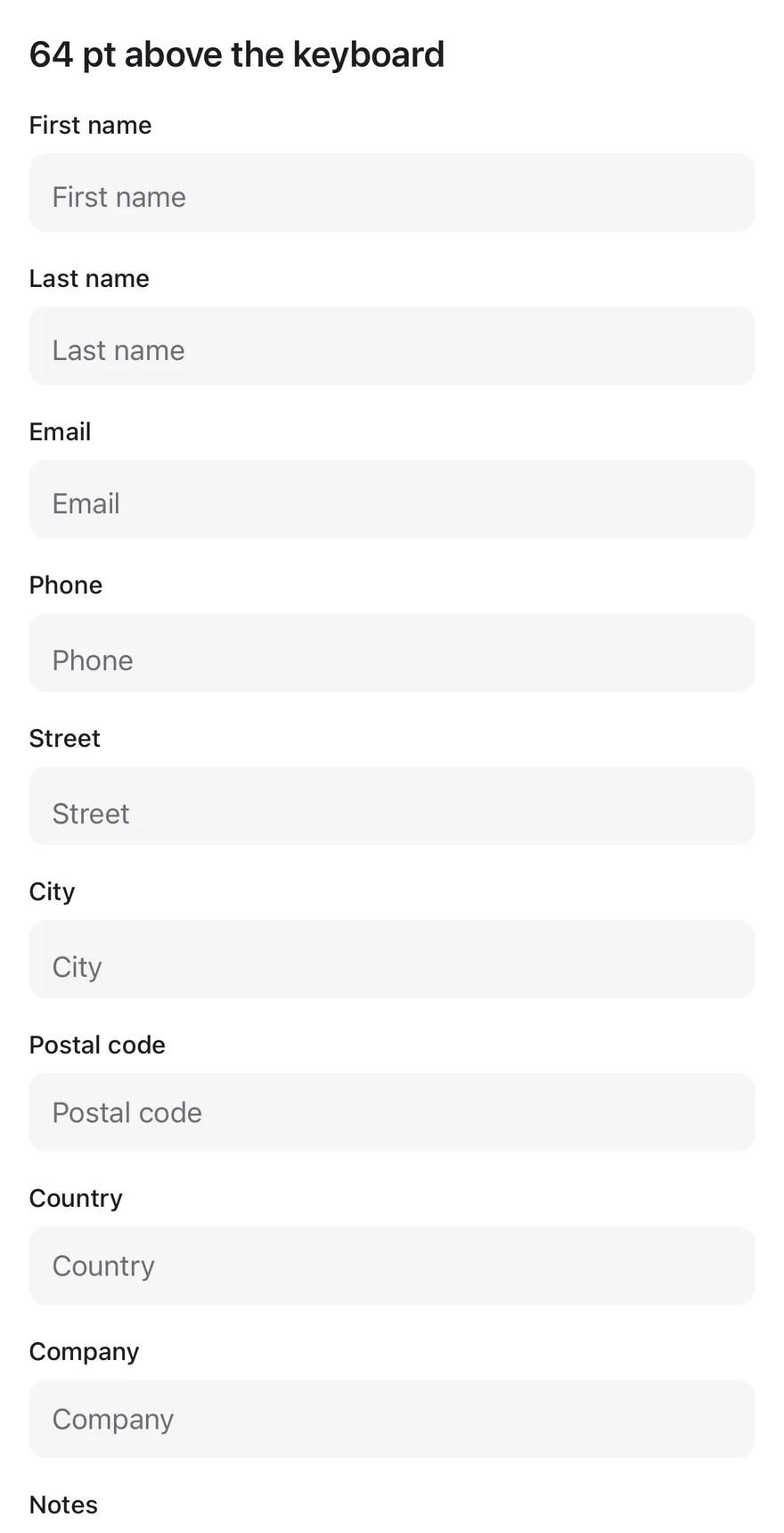
Keeps the focused field 64 points above the keyboard.
```tsx
import { View } from "react-native"
import { Input } from "@/components/ui/input"
import { KeyboardScrollView } from "@/components/ui/keyboard-scroll-view"
import { Text } from "@/components/ui/text"
const fields = [
"First name",
"Last name",
"Email",
"Phone",
"Street",
"City",
"Postal code",
"Country",
"Company",
"Notes",
]
function Fields() {
return fields.map((label) => (
{label}
))
}
export function KeyboardScrollViewLargerBottomOffsetExample() {
return (
64 pt above the keyboard
)
}
```
### Focused
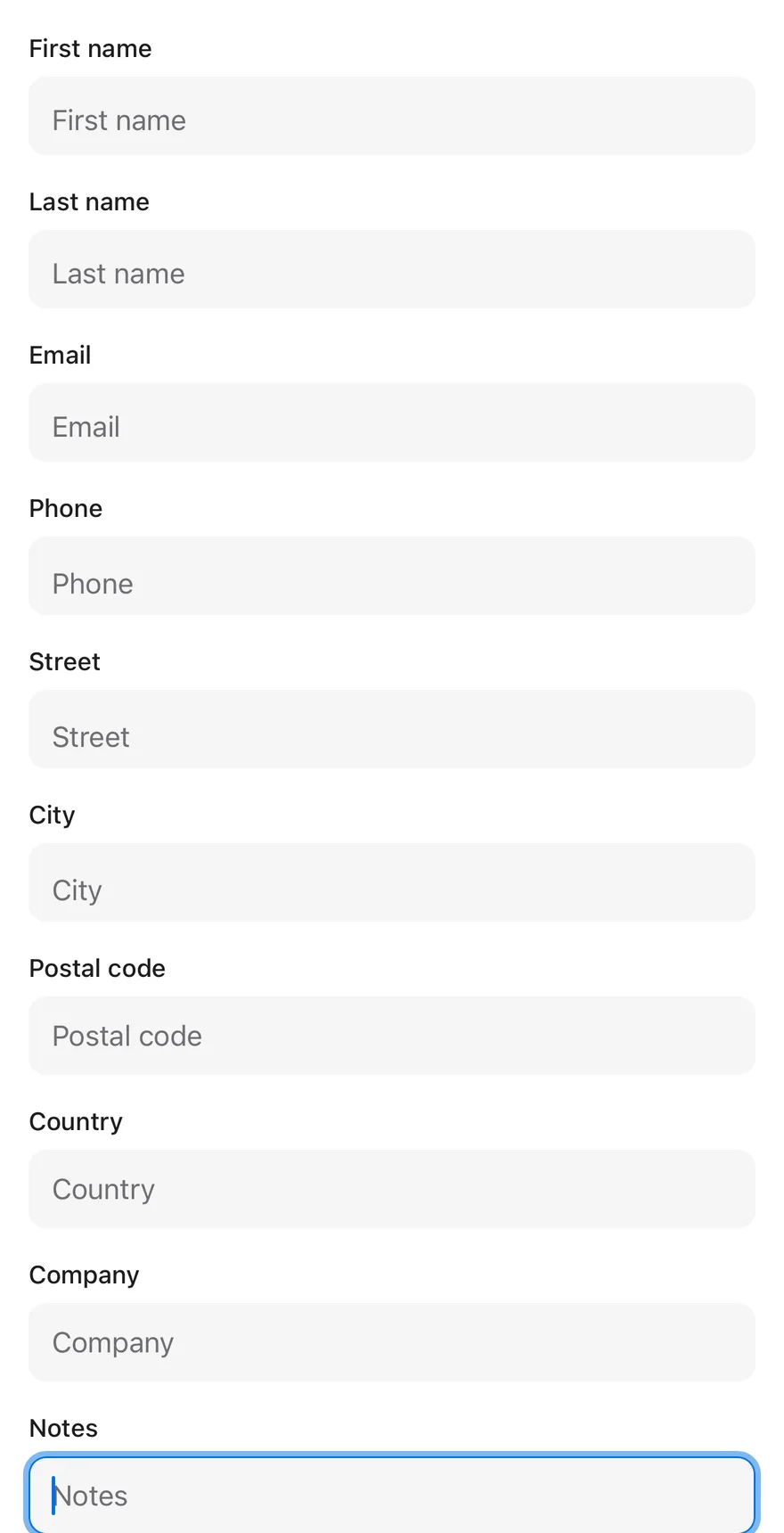
The last field is focused on mount and scrolled into view.
```tsx
import { View } from "react-native"
import { Input } from "@/components/ui/input"
import { KeyboardScrollView } from "@/components/ui/keyboard-scroll-view"
import { Text } from "@/components/ui/text"
const fields = [
"First name",
"Last name",
"Email",
"Phone",
"Street",
"City",
"Postal code",
"Country",
"Company",
"Notes",
]
export function KeyboardScrollViewFocusedExample() {
return (
Last field focused
{fields.slice(0, -1).map((label) => (
{label}
))}
Notes
)
}
```
```swift
import EsuissUI
import SwiftUI
struct KeyboardScrollViewFields: View {
static let all = [
"First name",
"Last name",
"Email",
"Phone",
"Street",
"City",
"Postal code",
"Country",
"Company",
"Notes",
]
let labels: [String]
var body: some View {
ForEach(labels, id: \.self) { label in
KeyboardScrollViewField(label: label)
}
}
}
struct KeyboardScrollViewField: View {
let label: String
@State private var text = ""
var body: some View {
VStack(alignment: .leading, spacing: 6) {
Text(label).textVariant(.small)
TextField(label, text: $text)
.textFieldStyle(.input)
}
.frame(maxWidth: .infinity, alignment: .leading)
}
}
struct KeyboardScrollViewFocused: View {
@State private var notes = ""
@FocusState private var focused: Bool
var body: some View {
KeyboardScrollView {
VStack(alignment: .leading, spacing: 16) {
Text("Last field focused").textVariant(.h3)
KeyboardScrollViewFields(labels: Array(KeyboardScrollViewFields.all.dropLast()))
VStack(alignment: .leading, spacing: 6) {
Text("Notes").textVariant(.small)
TextField("Notes", text: $notes)
.textFieldStyle(.input)
.focused($focused)
}
.frame(maxWidth: .infinity, alignment: .leading)
}
.padding(16)
}
.onAppear { focused = true }
}
}
let all = [
"First name",
"Last name",
"Email",
"Phone",
"Street",
"City",
"Postal code",
"Country",
"Company",
"Notes",
]
```
```kotlin
import androidx.compose.foundation.layout.Arrangement
import androidx.compose.foundation.layout.Column
import androidx.compose.foundation.layout.PaddingValues
import androidx.compose.foundation.layout.fillMaxSize
import androidx.compose.runtime.Composable
import androidx.compose.runtime.LaunchedEffect
import androidx.compose.runtime.getValue
import androidx.compose.runtime.key
import androidx.compose.runtime.mutableStateOf
import androidx.compose.runtime.remember
import androidx.compose.runtime.saveable.rememberSaveable
import androidx.compose.runtime.setValue
import androidx.compose.ui.Modifier
import androidx.compose.ui.focus.FocusRequester
import androidx.compose.ui.focus.focusRequester
import androidx.compose.ui.unit.dp
import com.esuiss.ui.components.Input
import com.esuiss.ui.components.KeyboardScrollView
import com.esuiss.ui.components.Screen
import com.esuiss.ui.components.Text
import com.esuiss.ui.components.TextVariant
val keyboardScrollViewFields = listOf(
"First name",
"Last name",
"Email",
"Phone",
"Street",
"City",
"Postal code",
"Country",
"Company",
"Notes",
)
@Composable
fun KeyboardScrollViewField(label: String, modifier: Modifier = Modifier) {
var value by rememberSaveable(label) { mutableStateOf("") }
Column(verticalArrangement = Arrangement.spacedBy(6.dp)) {
Text(label, variant = TextVariant.Small)
Input(value, { value = it }, modifier, placeholder = label)
}
}
@Composable
fun KeyboardScrollViewFocused() {
val focus = remember { FocusRequester() }
LaunchedEffect(Unit) { focus.requestFocus() }
Screen {
KeyboardScrollView(
modifier = Modifier.fillMaxSize(),
contentPadding = PaddingValues(16.dp),
verticalArrangement = Arrangement.spacedBy(16.dp),
) {
Text("Last field focused", variant = TextVariant.H3)
keyboardScrollViewFields.dropLast(1).forEach { key(it) { KeyboardScrollViewField(it) } }
KeyboardScrollViewField("Notes", Modifier.focusRequester(focus))
}
}
}
```
### With bottom bar
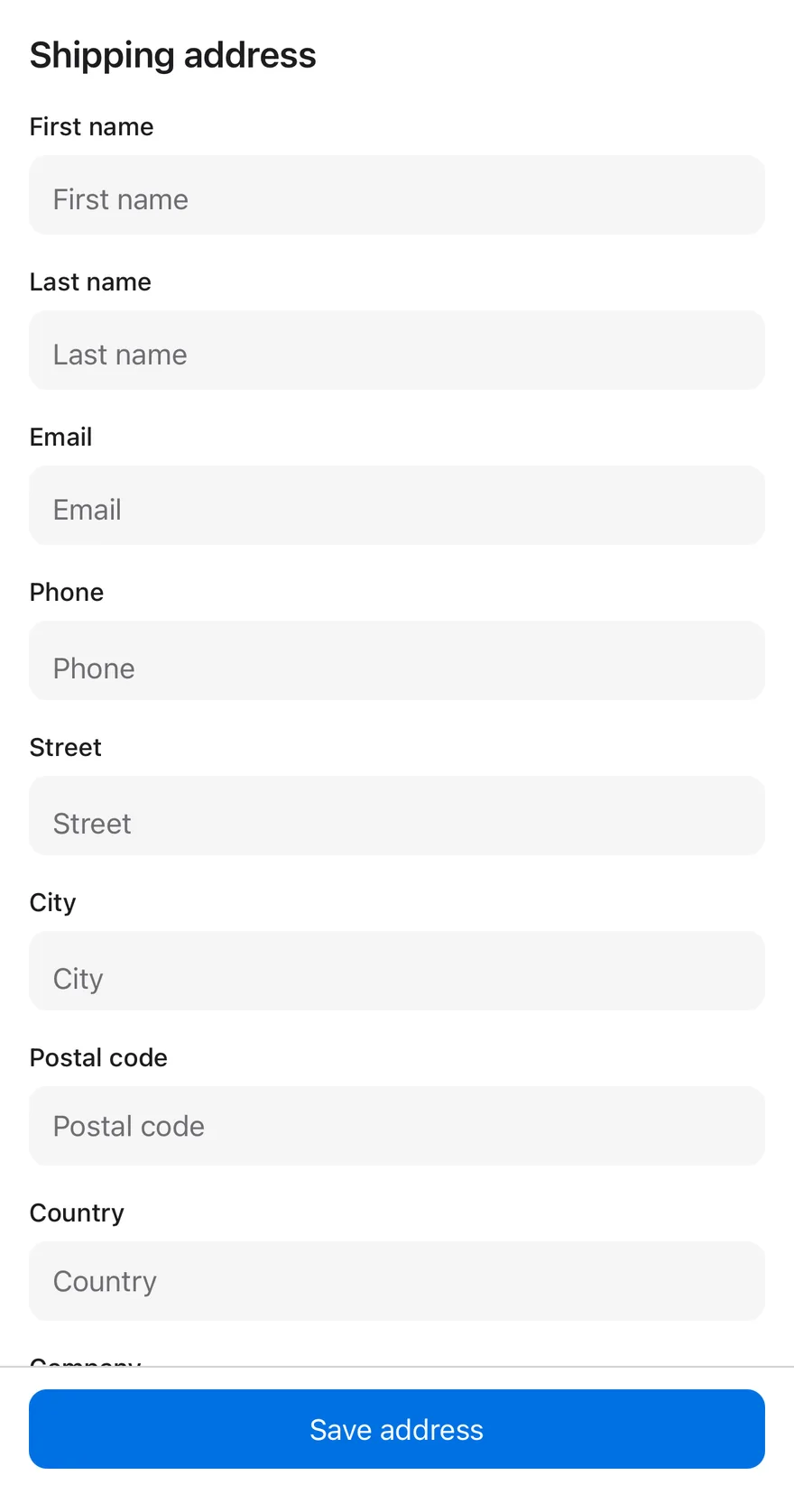
A form above a bottom bar with a full-width button.
```tsx
import { View } from "react-native"
import { BottomBar, BottomBarContent } from "@/components/ui/bottom-bar"
import { Button } from "@/components/ui/button"
import { Input } from "@/components/ui/input"
import { KeyboardScrollView } from "@/components/ui/keyboard-scroll-view"
import { Text } from "@/components/ui/text"
const fields = [
"First name",
"Last name",
"Email",
"Phone",
"Street",
"City",
"Postal code",
"Country",
"Company",
"Notes",
]
function Fields() {
return fields.map((label) => (
{label}
))
}
export function KeyboardScrollViewWithBottomBarExample() {
return (
Shipping address
)
}
```
```swift
import EsuissUI
import SwiftUI
struct KeyboardScrollViewWithBottomBarExample: View {
var body: some View {
VStack(spacing: 0) {
KeyboardScrollView {
VStack(alignment: .leading, spacing: 16) {
Text("Shipping address").textVariant(.h3)
KeyboardScrollViewFields(labels: KeyboardScrollViewFields.all)
}
.padding(16)
}
BottomBar(separator: true) {
BottomBarContent {
Button("Save address") {}
.buttonStyle(.variant(size: .lg, block: true))
}
}
}
}
}
struct KeyboardScrollViewFields: View {
static let all = [
"First name",
"Last name",
"Email",
"Phone",
"Street",
"City",
"Postal code",
"Country",
"Company",
"Notes",
]
let labels: [String]
var body: some View {
ForEach(labels, id: \.self) { label in
KeyboardScrollViewField(label: label)
}
}
}
struct KeyboardScrollViewField: View {
let label: String
@State private var text = ""
var body: some View {
VStack(alignment: .leading, spacing: 6) {
Text(label).textVariant(.small)
TextField(label, text: $text)
.textFieldStyle(.input)
}
.frame(maxWidth: .infinity, alignment: .leading)
}
}
let all = [
"First name",
"Last name",
"Email",
"Phone",
"Street",
"City",
"Postal code",
"Country",
"Company",
"Notes",
]
```
```kotlin
import androidx.compose.foundation.layout.Arrangement
import androidx.compose.foundation.layout.Column
import androidx.compose.foundation.layout.PaddingValues
import androidx.compose.foundation.layout.fillMaxSize
import androidx.compose.foundation.layout.fillMaxWidth
import androidx.compose.runtime.Composable
import androidx.compose.ui.Modifier
import androidx.compose.ui.unit.dp
import com.esuiss.ui.components.BottomBar
import com.esuiss.ui.components.BottomBarContent
import com.esuiss.ui.components.Button
import com.esuiss.ui.components.ButtonSize
import com.esuiss.ui.components.KeyboardScrollView
import com.esuiss.ui.components.Screen
import com.esuiss.ui.components.ScreenEdge
import com.esuiss.ui.components.Text
import com.esuiss.ui.components.TextVariant
@Composable
fun KeyboardScrollViewWithBottomBar() {
Screen(edges = setOf(ScreenEdge.Top, ScreenEdge.Left, ScreenEdge.Right)) {
Column(Modifier.fillMaxSize()) {
KeyboardScrollView(
modifier = Modifier.weight(1f).fillMaxWidth(),
contentPadding = PaddingValues(16.dp),
verticalArrangement = Arrangement.spacedBy(16.dp),
) {
Text("Shipping address", variant = TextVariant.H3)
KeyboardScrollViewFields()
}
BottomBar(separator = true) {
BottomBarContent {
Button("Save address", onClick = {}, size = ButtonSize.Lg, block = true)
}
}
}
}
}
```
## API Reference
### KeyboardScrollView
| Prop | Type | Default | Description |
| --- | --- | --- | --- |
| `bottomOffset` | `number` | `16` | Space kept between the focused input and the keyboard. Defaults to `16`. |
Also accepts the props of `ScrollViewProps`, `React.RefAttributes`.
## Accessibility
- The view is a standard `ScrollView`, so screen reader scrolling works as usual.
## Notes
- `keyboardDismissMode` defaults to `interactive` on iOS and `on-drag` on Android.
- After a touch while the keyboard is open, the view checks the focused input again after a short delay.
- The view fills its parent with `flex-1`.
- Only an input that is inside the visible frame of the scroll view is adjusted; inputs scrolled out of view are left alone.