# Empty Offline
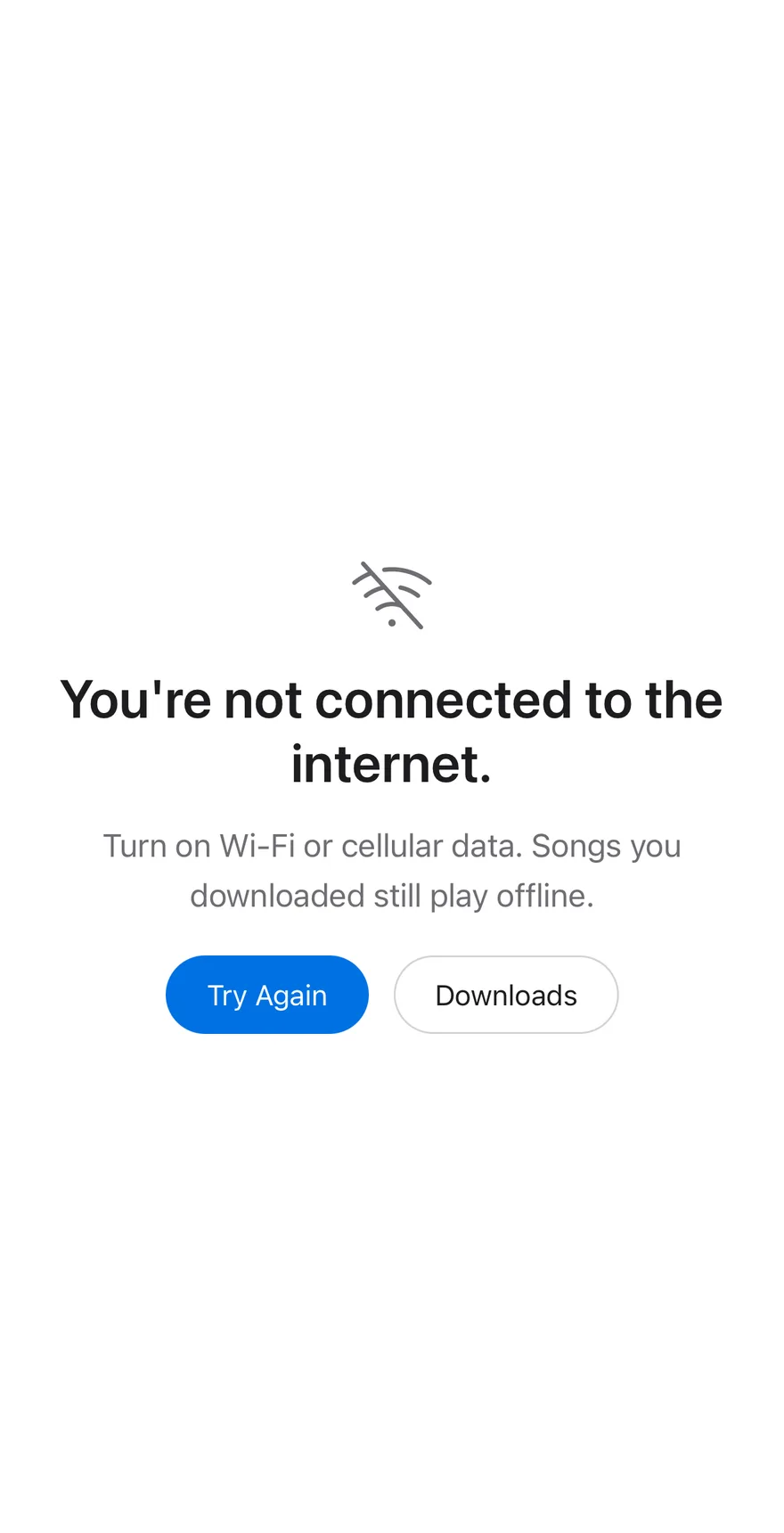
An offline empty state with a retry action that reconnects and reveals a grid of albums.
Empty Offline is an open-source block from suiss/ui for React, React Native, SwiftUI and Jetpack Compose. The @esuiss/ui CLI copies its source into your project, so you own the code.
Source: https://ui.suiss.app/docs/blocks/empty-offline
**React**
**Example**
```tsx title="components/blocks/empty-offline.tsx"
"use client"
import { WifiSlashIcon } from "@phosphor-icons/react"
import * as React from "react"
import { Button } from "@/components/ui/button"
import {
Empty,
EmptyContent,
EmptyDescription,
EmptyHeader,
EmptyMedia,
EmptyTitle,
} from "@/components/ui/empty"
import { Spinner } from "@/components/ui/spinner"
const photo = (id: string) =>
`https://images.unsplash.com/photo-${id}?w=400&q=80&auto=format&fit=crop`
const albums = [
{ title: "Orange Hour", image: photo("1633596683562-4a47eb4983c5") },
{ title: "Soft Shapes", image: photo("1645323927877-3de25b4f819c") },
{ title: "Low Light", image: photo("1760978631841-f3754859ca59") },
{ title: "Waves", image: photo("1707324148764-99647364afa3") },
]
export function EmptyOffline() {
const [state, setState] = React.useState<"offline" | "loading" | "online">(
"offline"
)
React.useEffect(() => {
if (state !== "loading") return
const timer = window.setTimeout(() => setState("online"), 1400)
return () => window.clearTimeout(timer)
}, [state])
if (state === "online") {
return (
suiss Music
{albums.map((album) => (
{album.title}
))}
)
}
return (
You're not connected to the internet.
Turn on Wi-Fi or cellular data. Songs you downloaded still play
offline.
)
}
```
An offline state for a content app, with a Wi-Fi icon, an explanation and Try Again and Downloads buttons. Try Again shows a spinner while reconnecting, then reveals an album grid. Use it as the no-connection screen for media, feeds or any app that can fall back to cached content.
## Installation
### CLI
```bash title="Terminal"
npx shadcn@latest add @esuiss/empty-offline
```
Works in any project with a `components.json`. See [Installation](https://ui.suiss.app/docs/installation#add-components) for the one-line registry setup. Or use the suiss/ui CLI:
```bash title="Terminal"
npx @esuiss/ui@latest add blocks empty-offline
```
### Manual
1. Install the dependencies:
```bash title="Terminal"
npm install @phosphor-icons/react
```
2. Add the pieces it builds on: [Button](https://ui.suiss.app/docs/components/button), [Empty](https://ui.suiss.app/docs/components/empty), [Spinner](https://ui.suiss.app/docs/components/spinner).
3. Copy the source into `components/blocks/empty-offline.tsx`:
```tsx title="components/blocks/empty-offline.tsx"
"use client"
import { WifiSlashIcon } from "@phosphor-icons/react"
import * as React from "react"
import { Button } from "@/components/ui/button"
import {
Empty,
EmptyContent,
EmptyDescription,
EmptyHeader,
EmptyMedia,
EmptyTitle,
} from "@/components/ui/empty"
import { Spinner } from "@/components/ui/spinner"
const photo = (id: string) =>
`https://images.unsplash.com/photo-${id}?w=400&q=80&auto=format&fit=crop`
const albums = [
{ title: "Orange Hour", image: photo("1633596683562-4a47eb4983c5") },
{ title: "Soft Shapes", image: photo("1645323927877-3de25b4f819c") },
{ title: "Low Light", image: photo("1760978631841-f3754859ca59") },
{ title: "Waves", image: photo("1707324148764-99647364afa3") },
]
export function EmptyOffline() {
const [state, setState] = React.useState<"offline" | "loading" | "online">(
"offline"
)
React.useEffect(() => {
if (state !== "loading") return
const timer = window.setTimeout(() => setState("online"), 1400)
return () => window.clearTimeout(timer)
}, [state])
if (state === "online") {
return (
suiss Music
{albums.map((album) => (
{album.title}
))}
)
}
return (
You're not connected to the internet.
Turn on Wi-Fi or cellular data. Songs you downloaded still play
offline.
)
}
```
4. Update the import paths to match your project.
## Usage
```tsx
import { EmptyOffline } from "@/components/blocks/empty-offline"
```
```tsx
```
Replace `albums` with your content. The demo fakes reconnecting with a timer; drive the offline, loading and online states from your network status or a refetch instead, and remove the Disconnect link from the online view. Give the Downloads button a handler.
## Notes
Album artwork is an Unsplash placeholder.
**React Native, SwiftUI, Jetpack Compose**
```tsx title="uniwind/components/blocks/empty-offline.tsx"
import { WifiSlashIcon } from "phosphor-react-native"
import * as React from "react"
import { Image, Pressable, ScrollView, View } from "react-native"
import { FadeInDown, ReduceMotion } from "react-native-reanimated"
import { AnimatedView } from "@/components/ui/animated-view"
import { Button } from "@/components/ui/button"
import {
Empty,
EmptyContent,
EmptyDescription,
EmptyHeader,
EmptyMedia,
EmptyTitle,
} from "@/components/ui/empty"
import { Icon } from "@/components/ui/icon"
import { Screen } from "@/components/ui/screen"
import { Spinner } from "@/components/ui/spinner"
import { Text } from "@/components/ui/text"
const photo = (id: string) =>
`https://images.unsplash.com/photo-${id}?w=400&q=80&auto=format&fit=crop`
const ALBUMS = [
{ title: "Orange Hour", image: photo("1633596683562-4a47eb4983c5") },
{ title: "Soft Shapes", image: photo("1645323927877-3de25b4f819c") },
{ title: "Low Light", image: photo("1760978631841-f3754859ca59") },
{ title: "Waves", image: photo("1707324148764-99647364afa3") },
]
function EmptyOffline() {
const [state, setState] = React.useState<"offline" | "loading" | "online">(
"offline"
)
React.useEffect(() => {
if (state !== "loading") return
const timer = setTimeout(() => setState("online"), 1400)
return () => clearTimeout(timer)
}, [state])
if (state === "online") {
return (
suiss Music
setState("offline")}
className="active:opacity-60"
>
Disconnect ›
{ALBUMS.map((album) => (
{album.title}
))}
)
}
return (
You're not connected to the internet.
Turn on Wi-Fi or cellular data. Songs you downloaded still play
offline.
)
}
export { EmptyOffline }
```
```swift title="swift/Blocks/EmptyOffline.swift"
import PhosphorSwift
import SwiftUI
public struct EmptyOffline: View {
enum Status: Sendable {
case offline, loading, online
}
struct Album: Identifiable {
let title: String
let image: URL?
var id: String { title }
}
static func photo(_ id: String) -> URL? {
URL(string: "https://images.unsplash.com/photo-\(id)?w=400&q=80&auto=format&fit=crop")
}
static var albums: [Album] {
[
Album(title: "Orange Hour", image: photo("1633596683562-4a47eb4983c5")),
Album(title: "Soft Shapes", image: photo("1645323927877-3de25b4f819c")),
Album(title: "Low Light", image: photo("1760978631841-f3754859ca59")),
Album(title: "Waves", image: photo("1707324148764-99647364afa3")),
]
}
@State private var state: Status
private var connects = true
@Environment(\.accessibilityReduceMotion) private var reduceMotion
public init() {
self.init(state: .offline)
}
init(state: Status, connects: Bool = true) {
_state = State(initialValue: state)
self.connects = connects
}
public var body: some View {
Screen {
if state == .online {
online
.transition(.opacity.combined(with: .offset(y: 8)))
} else {
offline
}
}
.animation(reduceMotion ? nil : .timingCurve(0.32, 0.72, 0, 1, duration: 0.8), value: state == .online)
.task(id: state) {
guard state == .loading, connects else { return }
try? await Task.sleep(for: .milliseconds(1400))
guard !Task.isCancelled else { return }
state = .online
}
}
private var offline: some View {
Empty {
EmptyHeader {
EmptyMedia {
Ph.wifiSlash.light
.frame(width: 52, height: 52)
.foregroundStyle(EsuissColor.mutedForeground)
}
EmptyTitle("You're not connected to the internet.")
EmptyDescription("Turn on Wi-Fi or cellular data. Songs you downloaded still play offline.")
}
EmptyContent {
HStack(spacing: 14) {
Button {
state = .loading
} label: {
HStack(spacing: 6) {
if state == .loading {
Spinner()
}
Text(state == .loading ? "Connecting" : "Try Again")
}
}
.buttonStyle(.variant(.default, size: .lg))
.disabled(state == .loading)
Button("Downloads") {}
.buttonStyle(.variant(.outline, size: .lg))
}
}
}
.padding(-24)
}
private var online: some View {
KeyboardScrollView {
VStack(alignment: .leading, spacing: 16) {
HStack(spacing: 8) {
Text(verbatim: "suiss Music")
.scaledTextStyle(.xl2, weight: .bold)
.frame(maxWidth: .infinity, alignment: .leading)
.accessibilityAddTraits(.isHeader)
Button("Disconnect ›") { state = .offline }
.buttonStyle(EmptyOfflineLinkStyle())
}
LazyVGrid(columns: [GridItem(.flexible(), spacing: 14), GridItem(.flexible(), spacing: 14)], spacing: 14) {
ForEach(Self.albums) { album in
VStack(alignment: .leading, spacing: 6) {
EsuissColor.secondary
.aspectRatio(1, contentMode: .fit)
.overlay {
AsyncImage(url: album.image) { phase in
if let image = phase.image {
image.resizable().scaledToFill()
}
}
}
.clipShape(RoundedRectangle(cornerRadius: Radius.xl, style: .continuous))
.accessibilityHidden(true)
Text(verbatim: album.title)
.scaledFont(.sm, weight: .semibold)
}
}
}
}
.padding(.horizontal, 20)
.padding(.vertical, 30)
}
}
}
private struct EmptyOfflineLinkStyle: ButtonStyle {
func makeBody(configuration: Configuration) -> some View {
configuration.label
.scaledFont(.sm)
.foregroundStyle(EsuissColor.primary)
.opacity(configuration.isPressed ? 0.8 : 1)
.frame(minHeight: 44)
.contentShape(Rectangle())
}
}
```
```kt title="kotlin/blocks/EmptyOffline.kt"
package com.esuiss.ui.blocks
import androidx.compose.animation.core.Animatable
import androidx.compose.animation.core.CubicBezierEasing
import androidx.compose.animation.core.tween
import androidx.compose.foundation.background
import androidx.compose.foundation.clickable
import androidx.compose.foundation.interaction.MutableInteractionSource
import androidx.compose.foundation.interaction.collectIsPressedAsState
import androidx.compose.foundation.layout.Arrangement
import androidx.compose.foundation.layout.Box
import androidx.compose.foundation.layout.Column
import androidx.compose.foundation.layout.FlowRow
import androidx.compose.foundation.layout.Row
import androidx.compose.foundation.layout.aspectRatio
import androidx.compose.foundation.layout.fillMaxSize
import androidx.compose.foundation.layout.fillMaxWidth
import androidx.compose.foundation.layout.padding
import androidx.compose.foundation.rememberScrollState
import androidx.compose.foundation.shape.RoundedCornerShape
import androidx.compose.foundation.text.BasicText
import androidx.compose.foundation.verticalScroll
import androidx.compose.runtime.Composable
import androidx.compose.runtime.LaunchedEffect
import androidx.compose.runtime.getValue
import androidx.compose.runtime.mutableStateOf
import androidx.compose.runtime.remember
import androidx.compose.runtime.saveable.rememberSaveable
import androidx.compose.runtime.setValue
import androidx.compose.ui.Alignment
import androidx.compose.ui.Modifier
import androidx.compose.ui.graphics.Color
import androidx.compose.ui.graphics.graphicsLayer
import androidx.compose.ui.semantics.LiveRegionMode
import androidx.compose.ui.semantics.Role
import androidx.compose.ui.semantics.clearAndSetSemantics
import androidx.compose.ui.semantics.heading
import androidx.compose.ui.semantics.liveRegion
import androidx.compose.ui.semantics.semantics
import androidx.compose.ui.text.font.FontWeight
import androidx.compose.ui.text.style.TextAlign
import androidx.compose.ui.unit.dp
import com.adamglin.PhosphorIcons
import com.adamglin.phosphoricons.Light
import com.adamglin.phosphoricons.light.WifiSlash
import com.esuiss.ui.components.Button
import com.esuiss.ui.components.ButtonSize
import com.esuiss.ui.components.ButtonVariant
import com.esuiss.ui.components.Empty
import com.esuiss.ui.components.EmptyContent
import com.esuiss.ui.components.EmptyHeader
import com.esuiss.ui.components.EmptyMedia
import com.esuiss.ui.components.Icon
import com.esuiss.ui.components.LocalContentStyle
import com.esuiss.ui.components.Screen
import com.esuiss.ui.components.Spinner
import com.esuiss.ui.theme.Colors
import com.esuiss.ui.theme.EsuissTheme
import com.esuiss.ui.theme.Palette
import com.esuiss.ui.theme.Typography
import kotlinx.coroutines.delay
private val RevealEasing = CubicBezierEasing(0.32f, 0.72f, 0f, 1f)
private enum class Connection { Offline, Loading, Online }
private class Album(val title: String, val color: (Colors) -> Color)
private val Albums = listOf(
Album("Orange Hour") { Palette.orange500 },
Album("Soft Shapes") { Palette.teal400 },
Album("Low Light") { Palette.indigo500 },
Album("Waves") { Palette.cyan500 },
)
@Composable
fun EmptyOffline(
modifier: Modifier = Modifier,
) {
val colors = EsuissTheme.colors
var state by rememberSaveable { mutableStateOf(Connection.Offline) }
LaunchedEffect(state) {
if (state != Connection.Loading) return@LaunchedEffect
delay(1400)
state = Connection.Online
}
Screen(modifier) {
if (state == Connection.Online) {
Library { state = Connection.Offline }
return@Screen
}
Box(Modifier.fillMaxSize(), contentAlignment = Alignment.Center) {
Empty {
EmptyHeader {
EmptyMedia {
Icon(PhosphorIcons.Light.WifiSlash, contentDescription = null, size = 52.dp, tint = colors.mutedForeground)
}
BasicText(
"You're not connected to the internet.",
modifier = Modifier.semantics { heading() },
style = Typography.xl3.copy(color = colors.foreground, fontWeight = FontWeight.SemiBold, textAlign = TextAlign.Center),
)
BasicText(
"Turn on Wi-Fi or cellular data. Songs you downloaded still play offline.",
modifier = Modifier.padding(top = 6.dp),
style = Typography.lg.copy(color = colors.mutedForeground, textAlign = TextAlign.Center),
)
}
EmptyContent {
FlowRow(
horizontalArrangement = Arrangement.spacedBy(14.dp, Alignment.CenterHorizontally),
verticalArrangement = Arrangement.spacedBy(14.dp),
) {
val loading = state == Connection.Loading
Button(
onClick = {
state = Connection.Loading
},
modifier = Modifier.semantics { liveRegion = LiveRegionMode.Polite },
size = ButtonSize.Lg,
enabled = !loading,
) {
if (loading) Spinner(color = colors.primaryForeground)
BasicText(if (loading) "Connecting" else "Try Again", style = LocalContentStyle.current)
}
Button("Downloads", {}, variant = ButtonVariant.Outline, size = ButtonSize.Lg)
}
}
}
}
}
}
@Composable
private fun Library(onDisconnect: () -> Unit) {
val colors = EsuissTheme.colors
val appear = remember { Animatable(0f) }
LaunchedEffect(Unit) { appear.animateTo(1f, tween(800, easing = RevealEasing)) }
val interaction = remember { MutableInteractionSource() }
val pressed by interaction.collectIsPressedAsState()
Column(
Modifier
.fillMaxSize()
.verticalScroll(rememberScrollState())
.padding(horizontal = 20.dp, vertical = 30.dp)
.graphicsLayer {
alpha = appear.value
translationY = (1f - appear.value) * 8.dp.toPx()
},
verticalArrangement = Arrangement.spacedBy(16.dp),
) {
Row(verticalAlignment = Alignment.CenterVertically) {
BasicText(
"suiss Music",
modifier = Modifier
.weight(1f)
.semantics { heading() },
style = Typography.xl3.copy(color = colors.foreground, fontWeight = FontWeight.SemiBold),
)
BasicText(
"Disconnect ›",
modifier = Modifier
.graphicsLayer { alpha = if (pressed) 0.8f else 1f }
.clickable(interactionSource = interaction, indication = null, role = Role.Button, onClick = onDisconnect)
.padding(vertical = 8.dp),
style = Typography.sm.copy(color = colors.primary),
)
}
Albums.chunked(2).forEach { row ->
Row(horizontalArrangement = Arrangement.spacedBy(14.dp)) {
row.forEach { album ->
Column(Modifier.weight(1f), verticalArrangement = Arrangement.spacedBy(6.dp)) {
Box(
Modifier
.fillMaxWidth()
.aspectRatio(1f)
.background(album.color(colors), RoundedCornerShape(12.dp))
.clearAndSetSemantics {},
)
BasicText(album.title, style = Typography.sm.copy(color = colors.foreground, fontWeight = FontWeight.SemiBold))
}
}
}
}
}
}
```
Composes `Screen`, `Empty`, `Button`, `Spinner`, `Icon` and `Text`. Try Again shows a loading state for a moment and then switches to the online content, which has a Disconnect link back to the offline state.
## Installation
**React Native**
```bash title="Terminal"
npx shadcn@latest add @esuiss-rn/empty-offline
```
See [Installation](https://ui.suiss.app/docs/installation) for the `components.json` setup. Or use the suiss/ui CLI:
```bash title="Terminal"
npx @esuiss/ui@latest add empty-offline
```
**SwiftUI**
```bash title="Terminal"
npx @esuiss/ui@latest add empty-offline --platform swift
```
**Jetpack Compose**
```bash title="Terminal"
npx @esuiss/ui@latest add empty-offline --platform kotlin
```
The CLI also adds what it builds on: [Button](https://ui.suiss.app/docs/components/button), [Empty](https://ui.suiss.app/docs/components/empty), [Icon](https://ui.suiss.app/docs/components/icon), [Screen](https://ui.suiss.app/docs/components/screen), [Spinner](https://ui.suiss.app/docs/components/spinner), [Text](https://ui.suiss.app/docs/components/text). On React Native it also adds the animated view `components/ui/animated-view.tsx`.
### Manual
**React Native**
**Uniwind**
1. Install the dependencies:
```bash title="Terminal"
npx expo install phosphor-react-native react-native-reanimated react-native-svg react-native-worklets
```
2. Add the pieces it builds on: [Button](https://ui.suiss.app/docs/components/button), [Empty](https://ui.suiss.app/docs/components/empty), [Icon](https://ui.suiss.app/docs/components/icon), [Screen](https://ui.suiss.app/docs/components/screen), [Spinner](https://ui.suiss.app/docs/components/spinner), [Text](https://ui.suiss.app/docs/components/text), and the animated view `components/ui/animated-view.tsx` from the next step.
3. Copy the animated view into `components/ui/animated-view.tsx`:
- `uniwind/components/ui/animated-view.tsx`: [source](https://github.com/e-suiss/ui/blob/main/packages/mobile/uniwind/components/ui/animated-view.tsx)
4. Copy the source into `components/blocks/empty-offline.tsx`:
- `uniwind/components/blocks/empty-offline.tsx`: shown above
5. Update the import paths to match your project.
**NativeWind**
1. Install the dependencies:
```bash title="Terminal"
npx expo install phosphor-react-native react-native-reanimated react-native-svg react-native-worklets
```
2. Add the pieces it builds on: [Button](https://ui.suiss.app/docs/components/button), [Empty](https://ui.suiss.app/docs/components/empty), [Icon](https://ui.suiss.app/docs/components/icon), [Screen](https://ui.suiss.app/docs/components/screen), [Spinner](https://ui.suiss.app/docs/components/spinner), [Text](https://ui.suiss.app/docs/components/text), and the animated view `components/ui/animated-view.tsx` from the next step.
3. Copy the animated view into `components/ui/animated-view.tsx`:
- `nativewind/components/ui/animated-view.tsx`: [source](https://github.com/e-suiss/ui/blob/main/packages/mobile/nativewind/components/ui/animated-view.tsx)
4. Copy the source into `components/blocks/empty-offline.tsx`:
```tsx title="nativewind/components/blocks/empty-offline.tsx"
import { WifiSlashIcon } from "phosphor-react-native"
import * as React from "react"
import { Image, Pressable, ScrollView, View } from "react-native"
import { FadeInDown, ReduceMotion } from "react-native-reanimated"
import { AnimatedView } from "@/components/ui/animated-view"
import { Button } from "@/components/ui/button"
import {
Empty,
EmptyContent,
EmptyDescription,
EmptyHeader,
EmptyMedia,
EmptyTitle,
} from "@/components/ui/empty"
import { Icon } from "@/components/ui/icon"
import { Screen } from "@/components/ui/screen"
import { Spinner } from "@/components/ui/spinner"
import { Text } from "@/components/ui/text"
const photo = (id: string) =>
`https://images.unsplash.com/photo-${id}?w=400&q=80&auto=format&fit=crop`
const ALBUMS = [
{ title: "Orange Hour", image: photo("1633596683562-4a47eb4983c5") },
{ title: "Soft Shapes", image: photo("1645323927877-3de25b4f819c") },
{ title: "Low Light", image: photo("1760978631841-f3754859ca59") },
{ title: "Waves", image: photo("1707324148764-99647364afa3") },
]
function EmptyOffline() {
const [state, setState] = React.useState<"offline" | "loading" | "online">(
"offline"
)
React.useEffect(() => {
if (state !== "loading") return
const timer = setTimeout(() => setState("online"), 1400)
return () => clearTimeout(timer)
}, [state])
if (state === "online") {
return (
suiss Music
setState("offline")}
className="active:opacity-60"
>
Disconnect ›
{ALBUMS.map((album) => (
{album.title}
))}
)
}
return (
You're not connected to the internet.
Turn on Wi-Fi or cellular data. Songs you downloaded still play
offline.
)
}
export { EmptyOffline }
```
5. Update the import paths to match your project.
**StyleSheet**
1. Install the dependencies:
```bash title="Terminal"
npx expo install phosphor-react-native react-native-reanimated react-native-svg react-native-worklets
```
2. Add the pieces it builds on: [Button](https://ui.suiss.app/docs/components/button), [Empty](https://ui.suiss.app/docs/components/empty), [Icon](https://ui.suiss.app/docs/components/icon), [Screen](https://ui.suiss.app/docs/components/screen), [Spinner](https://ui.suiss.app/docs/components/spinner), [Text](https://ui.suiss.app/docs/components/text), and the animated view `components/ui/animated-view.tsx` from the next step.
3. Copy the animated view into `components/ui/animated-view.tsx`:
- `stylesheet/components/ui/animated-view.tsx`: [source](https://github.com/e-suiss/ui/blob/main/packages/mobile/stylesheet/components/ui/animated-view.tsx)
4. Copy the source into `components/blocks/empty-offline.tsx`:
```tsx title="stylesheet/components/blocks/empty-offline.tsx"
import { WifiSlashIcon } from "phosphor-react-native"
import * as React from "react"
import { Image, Pressable, ScrollView, StyleSheet, View } from "react-native"
import { FadeInDown, ReduceMotion } from "react-native-reanimated"
import { AnimatedView } from "@/components/ui/animated-view"
import { Button } from "@/components/ui/button"
import {
Empty,
EmptyContent,
EmptyDescription,
EmptyHeader,
EmptyMedia,
EmptyTitle,
} from "@/components/ui/empty"
import { Icon } from "@/components/ui/icon"
import { Screen } from "@/components/ui/screen"
import { Spinner } from "@/components/ui/spinner"
import { Text } from "@/components/ui/text"
import { fontSize, radius, useTheme } from "@/components/ui/theme"
const photo = (id: string) =>
`https://images.unsplash.com/photo-${id}?w=400&q=80&auto=format&fit=crop`
const ALBUMS = [
{ title: "Orange Hour", image: photo("1633596683562-4a47eb4983c5") },
{ title: "Soft Shapes", image: photo("1645323927877-3de25b4f819c") },
{ title: "Low Light", image: photo("1760978631841-f3754859ca59") },
{ title: "Waves", image: photo("1707324148764-99647364afa3") },
]
const styles = StyleSheet.create({
onlineContent: { paddingHorizontal: 20, paddingVertical: 30 },
online: { gap: 16 },
headerRow: { flexDirection: "row", alignItems: "center", gap: 8 },
heading: { ...fontSize["3xl"], flex: 1, fontWeight: "600" },
link: { ...fontSize.sm },
grid: { flexDirection: "row", flexWrap: "wrap", gap: 14 },
album: { flexGrow: 1, flexBasis: "40%", gap: 6 },
cover: { aspectRatio: 1, width: "100%", borderRadius: radius.xl },
albumTitle: { ...fontSize.sm, fontWeight: "600" },
empty: { gap: 20, padding: 24 },
header: { maxWidth: 380, gap: 14 },
media: { marginBottom: 0 },
title: { ...fontSize["3xl"], fontWeight: "600" },
description: { ...fontSize.lg },
actions: { flexDirection: "row", justifyContent: "center", gap: 14 },
})
function EmptyOffline() {
const { colors } = useTheme()
const [state, setState] = React.useState<"offline" | "loading" | "online">(
"offline"
)
React.useEffect(() => {
if (state !== "loading") return
const timer = setTimeout(() => setState("online"), 1400)
return () => clearTimeout(timer)
}, [state])
if (state === "online") {
return (
suiss Music
setState("offline")}
style={({ pressed }) => pressed && { opacity: 0.6 }}
>
Disconnect ›
{ALBUMS.map((album) => (
{album.title}
))}
)
}
return (
You're not connected to the internet.
Turn on Wi-Fi or cellular data. Songs you downloaded still play
offline.
)
}
export { EmptyOffline }
```
5. Update the import paths to match your project.
**SwiftUI**
1. Target iOS 17 or later.
2. Add the Swift package to your app:
```swift title="Package.swift"
.package(url: "https://github.com/phosphor-icons/swift", from: "2.1.0")
```
3. Copy the theme files every view uses:
- `swift/Theme/Theme.swift`: [source](https://github.com/e-suiss/ui/blob/main/packages/mobile/swiftui/Sources/EsuissUI/Theme/Theme.swift)
- `swift/Theme/Tokens.swift`: [source](https://github.com/e-suiss/ui/blob/main/packages/mobile/swiftui/Sources/EsuissUI/Theme/Tokens.swift)
4. Copy the source and every file it uses:
- `swift/Blocks/EmptyOffline.swift`: shown above
- `swift/Components/Button.swift`: see [Button](https://ui.suiss.app/docs/components/button.md)
- `swift/Components/ButtonGroup.swift`: see [Button Group](https://ui.suiss.app/docs/components/button-group.md)
- `swift/Components/Empty.swift`: see [Empty](https://ui.suiss.app/docs/components/empty.md)
- `swift/Components/KeyboardScrollView.swift`: see [Keyboard Scroll View](https://ui.suiss.app/docs/components/keyboard-scroll-view.md)
- `swift/Components/Screen.swift`: see [Screen](https://ui.suiss.app/docs/components/screen.md)
- `swift/Components/Spinner.swift`: see [Spinner](https://ui.suiss.app/docs/components/spinner.md)
- `swift/Components/TextVariant.swift`: [source](https://github.com/e-suiss/ui/blob/main/packages/mobile/swiftui/Sources/EsuissUI/Components/TextVariant.swift)
5. Add the files to your app target.
**Jetpack Compose**
1. Set `minSdk` to 24 or higher and add the dependencies:
```kotlin title="build.gradle.kts"
implementation(platform("androidx.compose:compose-bom:2026.09.00"))
implementation("androidx.compose.foundation:foundation")
implementation("androidx.compose.ui:ui")
implementation("com.adamglin:phosphor-icon-android:1.0.0")
```
2. Copy the theme files every view uses:
- `kotlin/theme/Theme.kt`: [source](https://github.com/e-suiss/ui/blob/main/packages/mobile/kotlin/ui/src/main/kotlin/com/esuiss/ui/theme/Theme.kt)
- `kotlin/theme/Tokens.kt`: [source](https://github.com/e-suiss/ui/blob/main/packages/mobile/kotlin/ui/src/main/kotlin/com/esuiss/ui/theme/Tokens.kt)
3. Copy the source and every file it uses:
- `kotlin/blocks/EmptyOffline.kt`: shown above
- `kotlin/components/Button.kt`: see [Button](https://ui.suiss.app/docs/components/button.md)
- `kotlin/components/ButtonGroup.kt`: see [Button Group](https://ui.suiss.app/docs/components/button-group.md)
- `kotlin/components/Content.kt`: [source](https://github.com/e-suiss/ui/blob/main/packages/mobile/kotlin/ui/src/main/kotlin/com/esuiss/ui/components/Content.kt)
- `kotlin/components/Empty.kt`: see [Empty](https://ui.suiss.app/docs/components/empty.md)
- `kotlin/components/FormSupport.kt`: [source](https://github.com/e-suiss/ui/blob/main/packages/mobile/kotlin/ui/src/main/kotlin/com/esuiss/ui/components/FormSupport.kt)
- `kotlin/components/Icon.kt`: see [Icon](https://ui.suiss.app/docs/components/icon.md)
- `kotlin/components/Screen.kt`: see [Screen](https://ui.suiss.app/docs/components/screen.md)
- `kotlin/components/Spinner.kt`: see [Spinner](https://ui.suiss.app/docs/components/spinner.md)
4. Update the `com.esuiss.ui` package names to match your project.
## Usage
```tsx
import { EmptyOffline } from "@/components/blocks/empty-offline"
```
```tsx
```
Replace `ALBUMS` with your content and the timed retry with a real connectivity check. The component takes no props.
{album.title}
))}